Artificial Intelligence, zBlog
Apps Like ChatGPT in 2026: An Honest Comparison of the Best AI Assistants
trantorindia | Updated: August 5, 2026
What are the best apps like ChatGPT in 2026?
The best apps like ChatGPT in 2026 are Claude (Anthropic) for long documents and nuanced writing, Perplexity for research with verified sources, Microsoft Copilot for Microsoft 365 integration, Google Gemini for Google Workspace users, and Meta AI for free everyday use. ChatGPT itself remains the most versatile general-purpose option. The right choice depends on your specific use case, not a single ranking.
There is no shortage of apps like ChatGPT in 2026. The problem is that most comparisons list 15 to 20 tools with a short paragraph on each, leaving you no better equipped to make an actual decision than you were before you started reading. This guide takes a different approach: it covers the five platforms that genuinely matter for most users, explains what each one does better than the others, gives you the real pricing with no omissions, and tells you honestly where each one falls short.
ChatGPT itself has 300 million weekly active users as of February 2026, according to OpenAI. But it is no longer the clear default for every task. Claude has emerged as the stronger choice for long-form writing and complex analysis. Perplexity has built the most reliable research assistant with source citations. Microsoft Copilot has become the dominant choice for anyone working inside Microsoft 365. Google Gemini brings the deepest Google Workspace integration and a context window of one million tokens that none of its competitors match. And Meta AI, which most enterprise comparisons ignore, now serves over 700 million monthly active users across WhatsApp, Instagram, and Facebook, making it the most widely used AI assistant globally even though it is rarely discussed in professional technology circles.
Whether you are looking for a free ChatGPT alternative for everyday tasks, evaluating AI tools for professional work, or trying to understand how these platforms differ before recommending one to your team, this guide gives you the honest comparison you actually need.
The most important thing to understand before comparing apps like ChatGPT: none of these platforms is best at everything. Each has made deliberate architectural and product choices that make it excellent at specific tasks and less suited for others. Choosing the right AI assistant is not about finding the objectively best tool. It is about finding the tool whose strengths match your actual workflow.
Sources: OpenAI Feb 2026, Meta Q4 2025 Earnings, Salesforce State of Connected Customer 2025, Grand View Research
Apps Like ChatGPT: The Full Comparison at a Glance
Before going deep on each platform, here is the complete side-by-side comparison across the dimensions that matter most for everyday and professional use.
ChatGPT vs Claude vs Perplexity vs Copilot vs Gemini: Feature Comparison 2026
| ChatGPT | Claude | Perplexity | Copilot | Gemini | |
|---|---|---|---|---|---|
| Best for | General use, coding, research, image gen | Long documents, coding, nuanced writing | Search with sources, real-time web | Work productivity, Office 365 integration | Multimodal, Google Workspace integration |
| Context window | 128K tokens (GPT-4o) | 200K tokens (Claude Opus) | Varies by model | 16K tokens (standard) | 1M tokens (Gemini 1.5 Pro) |
| Real-time web | Yes (with search) | Yes (with search) | Yes, native | Yes, native | Yes, native |
| Free tier | Yes, GPT-4o limited | Yes, Claude Sonnet limited | Yes, with source citations | Yes, via Microsoft account | Yes, Gemini 1.0 standard |
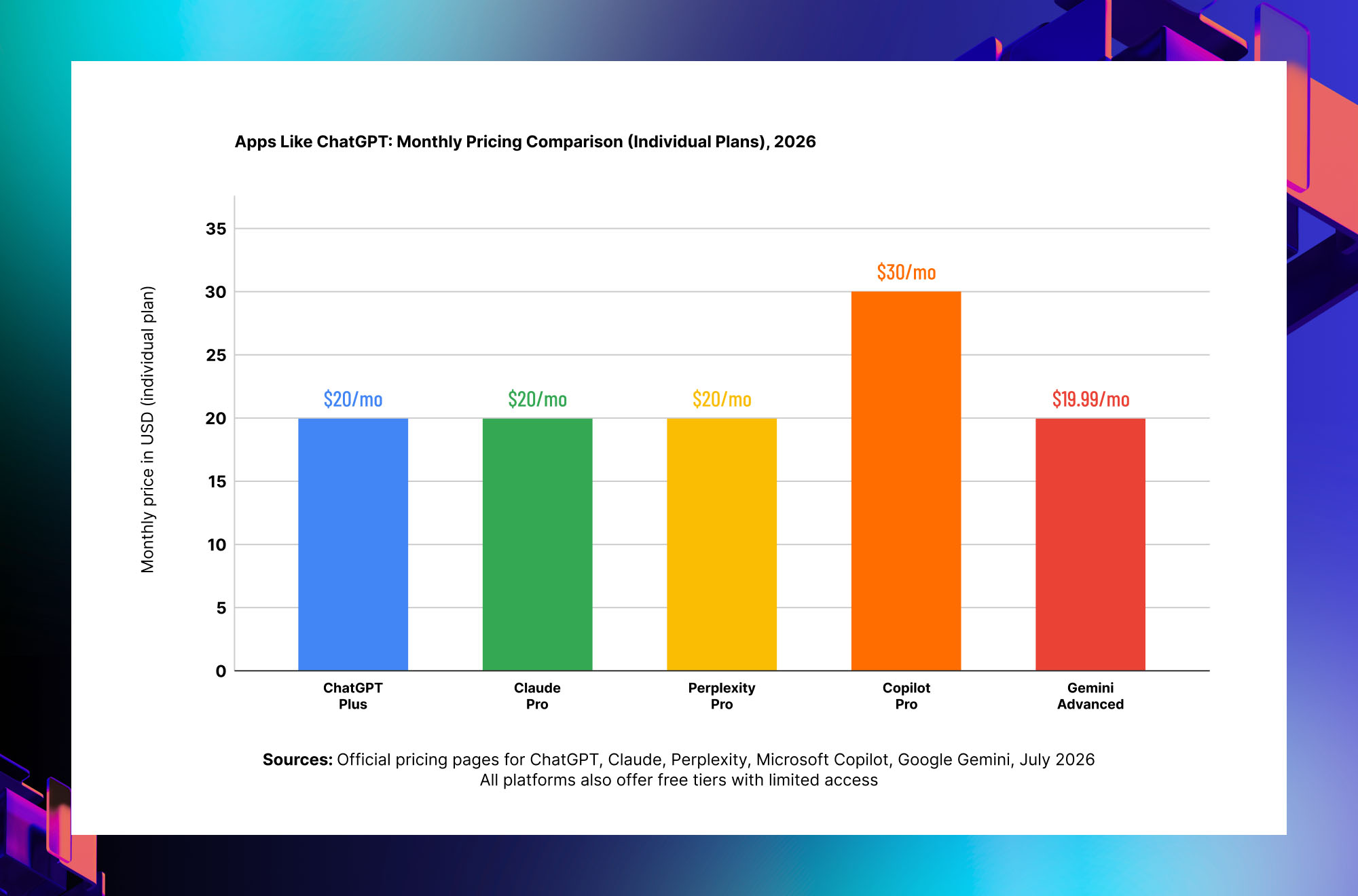
| Paid price | $20/mo Plus, $25/mo Team | $20/mo Pro, $25/mo Team | $20/mo Pro | $30/mo Copilot Pro | $19.99/mo Gemini Advanced |
| Enterprise | ChatGPT Enterprise | Claude Enterprise | Perplexity Enterprise Pro | Microsoft 365 Copilot $30/user | Gemini for Workspace |
| ChatGPT | |
|---|---|
| Best for | General use, coding, research, image gen |
| Context window | 128K tokens (GPT-4o) |
| Real-time web | Yes (with search) |
| Free tier | Yes, GPT-4o limited |
| Paid price | $20/mo Plus, $25/mo Team |
| Enterprise | ChatGPT Enterprise |
| Claude | |
|---|---|
| Best for | Long documents, coding, nuanced writing |
| Context window | 200K tokens (Claude Opus) |
| Real-time web | Yes (with search) |
| Free tier | Yes, Claude Sonnet limited |
| Paid price | $20/mo Pro, $25/mo Team |
| Enterprise | Claude Enterprise |
| Perplexity | |
|---|---|
| Best for | Search with sources, real-time web |
| Context window | Varies by model |
| Real-time web | Yes, native |
| Free tier | Yes, with source citations |
| Paid price | $20/mo Pro |
| Enterprise | Perplexity Enterprise Pro |
| Copilot | |
|---|---|
| Best for | Work productivity, Office 365 integration |
| Context window | 16K tokens (standard) |
| Real-time web | Yes, native |
| Free tier | Yes, via Microsoft account |
| Paid price | $30/mo Copilot Pro |
| Enterprise | Microsoft 365 Copilot $30/user |
| Gemini | |
|---|---|
| Best for | Multimodal, Google Workspace integration |
| Context window | 1M tokens (Gemini 1.5 Pro) |
| Real-time web | Yes, native |
| Free tier | Yes, Gemini 1.0 standard |
| Paid price | $19.99/mo Gemini Advanced |
| Enterprise | Gemini for Workspace |
ChatGPT: Still the Most Versatile App Like ChatGPT (Obviously)
ChatGPT by OpenAI
The platform that defined the category and still leads on versatility, ecosystem, and general-purpose capability.
What it does best: General-purpose reasoning, coding across almost every language, image generation with DALL-E 3 built in, browsing, data analysis with Code Interpreter, and the largest library of custom GPTs for specialized tasks
Context window: 128,000 tokens with GPT-4o, which handles approximately 300 pages of text in a single conversation
Free tier: GPT-4o access on the free tier with daily usage limits. Sufficient for light everyday use.
Paid plans: ChatGPT Plus at $20 per month for individuals. ChatGPT Team at $25 per user per month. ChatGPT Enterprise for organizations requiring SSO, admin controls, and compliance features.
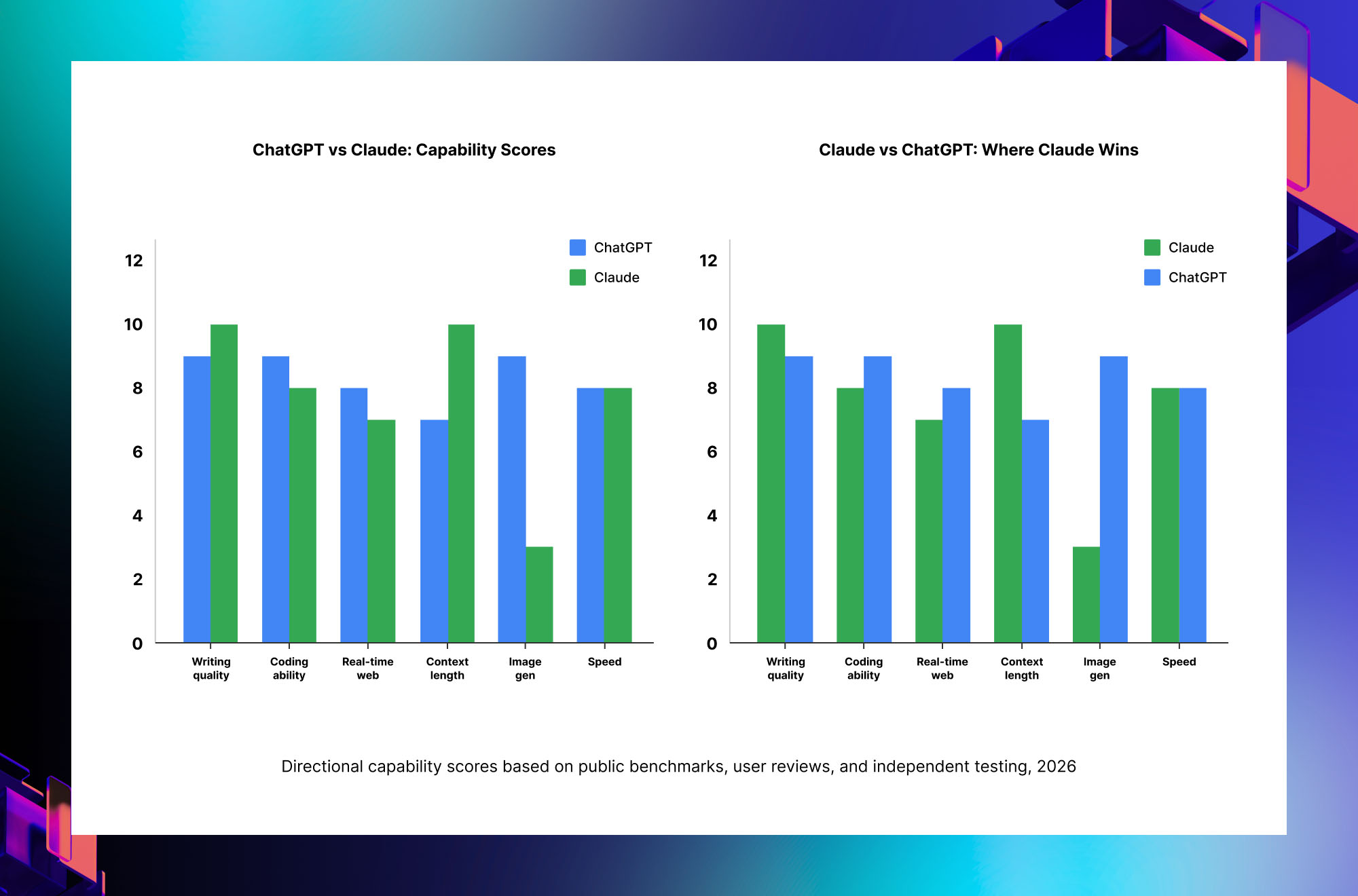
Where it falls short: Claude writes more naturally for long-form documents. Perplexity provides better source citations for research. Copilot integrates more deeply with Office 365. Gemini has a significantly longer context window at 1 million tokens.
Best for: Users who want one tool for almost everything: writing, coding, analysis, image generation, and custom workflows through the GPT Store
Claude by Anthropic
The strongest app like ChatGPT for long documents, nuanced writing, and tasks requiring careful, safety-conscious reasoning.
What it does best: Long-form document analysis and generation, nuanced writing that reads as genuinely human, careful reasoning on complex multi-step problems, and the most honest expression of uncertainty when the model is not confident in its answer
Context window: 200,000 tokens with Claude Opus, the largest context window of any mainstream AI assistant and sufficient for entire codebases or book-length documents in a single conversation
Free tier: Claude Sonnet access on the free tier with usage limits. Sonnet is Claude’s mid-tier model, meaningfully more capable than most competitors’ free offerings.
Paid plans: Claude Pro at $20 per month for individuals with priority access to Claude Opus, the most capable model. Claude Team at $25 per user per month. Claude Enterprise for larger organizations.
Where it falls short: No built-in image generation. Smaller ecosystem of third-party integrations compared to ChatGPT. No native mobile app with the breadth of features that ChatGPT’s iOS and Android apps provide.
Best for: Legal and financial professionals analyzing long documents, writers who want the most natural-sounding AI output, researchers working with book-length source material, and anyone who values careful, well-reasoned responses over speed
Perplexity AI
The best app like ChatGPT for research and any task where you need to verify that claims are backed by real, current sources.
What it does best: Every response includes cited sources, so you can verify claims immediately rather than taking the AI’s word for it. Native real-time web search means answers reflect current events and recently published information, not just training data from months ago.
Context window: Varies by underlying model. Perplexity uses a combination of its own models and access to GPT-4o and Claude depending on the query and plan tier.
Free tier: Generous free tier with full source citations on every response and basic web search. Daily limits on Pro searches.
Paid plans: Perplexity Pro at $20 per month with unlimited Pro searches, file upload analysis, and access to GPT-4o and Claude through the Perplexity interface.
Where it falls short: Less capable for creative writing and long-form document generation. Not ideal for coding-heavy workflows. The source citation approach is valuable for research but can feel slower than a direct conversational response for simple everyday tasks.
Best for: Research, fact-checking, staying current with recent events, competitive analysis, and any task where knowing where information came from matters as much as getting the answer quickly
Microsoft Copilot
The app like ChatGPT that beats every alternative when your daily work lives inside Microsoft 365.
What it does best: Native integration directly inside Word, Excel, PowerPoint, Outlook, and Teams. Summarizes emails, drafts responses in your writing style, generates PowerPoint decks from a text prompt, analyzes Excel data without requiring you to know formulas, and searches across your entire Microsoft 365 organization’s documents.
Context window: 16,000 tokens in the standard Copilot interface. Extended context available within specific Microsoft 365 application workflows.
Free tier: Microsoft Copilot is free as a standalone chat application at copilot.microsoft.com. The Microsoft 365 Copilot integration (inside Word, Excel, Teams, etc.) requires a paid plan.
Paid plans: Copilot Pro at $30 per month for individuals with Microsoft 365 application integration. Microsoft 365 Copilot for Business at $30 per user per month for enterprise teams.
Where it falls short: The standalone Copilot chat experience is less capable than ChatGPT or Claude for complex reasoning. The context window in standard use is shorter than competitors. Full value only materializes if you are already a heavy Microsoft 365 user.
Best for: Anyone who spends most of their working day in Outlook, Word, Excel, PowerPoint, or Teams and wants AI assistance embedded directly in those tools rather than in a separate browser tab
Google Gemini
The app like ChatGPT that goes deepest on Google Workspace integration and offers the longest context window of any mainstream AI assistant.
What it does best: One million token context window with Gemini 1.5 Pro, which can analyze entire code repositories, lengthy legal contracts, or hours of video content in a single session. Deep native integration with Gmail, Google Docs, Google Drive, and Google Search.
Context window: 1,000,000 tokens with Gemini 1.5 Pro, more than five times larger than Claude’s 200,000 token context and nearly eight times larger than ChatGPT’s 128,000 token limit
Free tier: Gemini 1.0 Ultra access is free. The Gemini app on Android and iOS is free with a Google account.
Paid plans: Gemini Advanced at $19.99 per month as part of Google One AI Premium, which also includes 2TB of Google Drive storage. Gemini for Google Workspace at $30 per user per month for business teams.
Where it falls short: Writing quality, particularly for long-form creative and professional documents, lags behind Claude. Coding benchmarks place it behind both ChatGPT and Claude on complex programming tasks. The multimodal capabilities, while extensive, are still catching up to GPT-4o in real-world testing.
Best for: Google Workspace power users, teams working with very long documents or datasets that exceed other platforms’ context limits, and anyone already deeply invested in the Google ecosystem
Which App Like ChatGPT Should You Actually Use?
The honest answer is that the right app like ChatGPT depends entirely on what you are trying to do. Here is the clearest decision framework based on actual use-case fit rather than marketing claims.
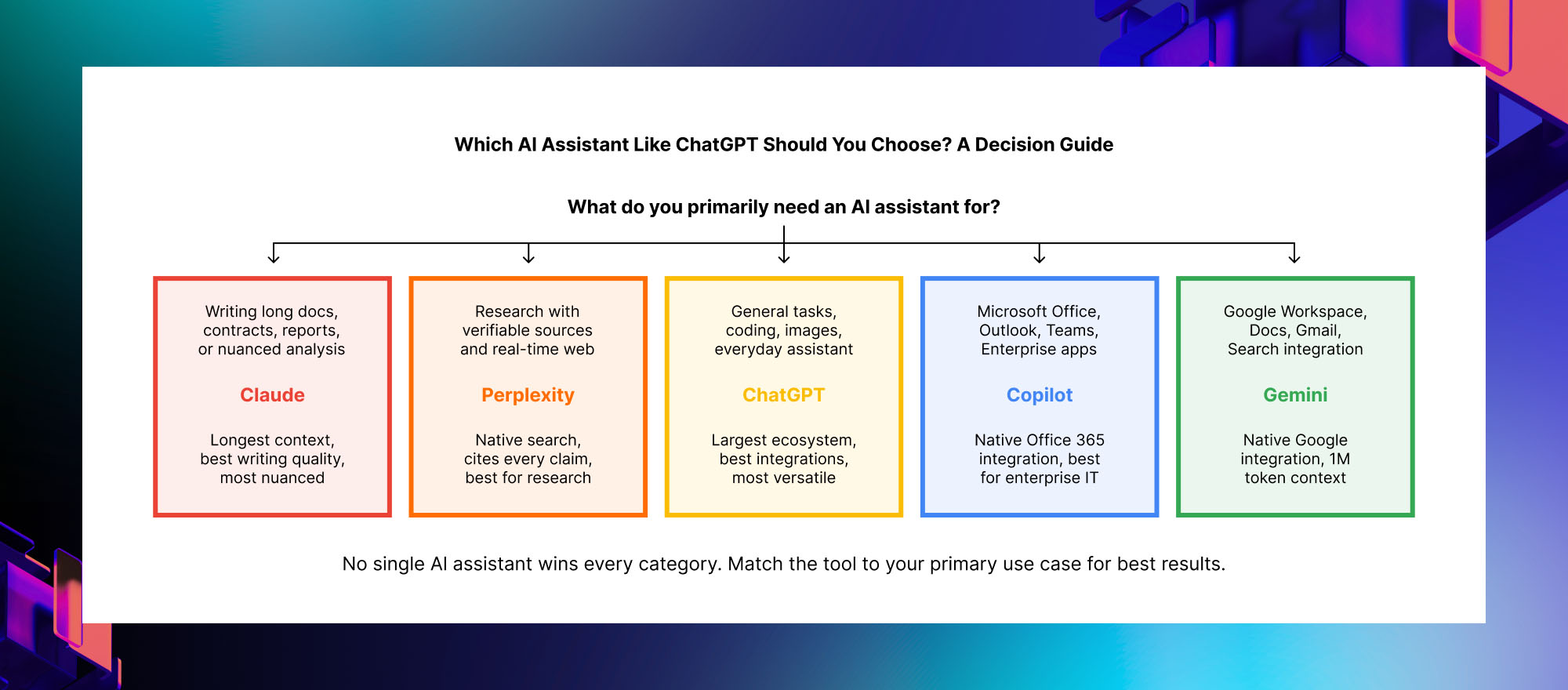
For writing quality and long documents: Claude is the clearest choice. Its 200,000 token context window means you can paste an entire contract, report, or research paper and work with it in a single session. Its writing output consistently ranks as the most natural-sounding among the major platforms in independent user evaluations.
For research and staying current: Perplexity is the strongest option because every response includes source citations. When you need to know not just what the answer is but where it comes from and whether it is accurate, Perplexity’s approach of searching the web for each query rather than relying on training data alone is meaningfully better than the alternatives.
For versatility and the widest task range: ChatGPT remains the most capable all-around platform, particularly if you use custom GPTs or rely on image generation alongside text. Its ecosystem of integrations and the breadth of its capabilities across coding, writing, analysis, and multimodal tasks make it the safest default choice when you do a wide variety of different things.
For Microsoft 365 users: Copilot provides a level of native integration with Outlook, Word, Excel, and Teams that none of the other apps like ChatGPT can match. If your daily work happens inside Microsoft applications, the ability to summarize your emails, draft responses in your own voice, and analyze your own documents without leaving the application you are already in is genuinely valuable.
For Google Workspace users: Gemini’s integration with Gmail, Docs, and Drive, combined with its one million token context window, makes it the strongest choice for teams that live in the Google ecosystem and need to work with very long or complex documents.
For everyday free use: Meta AI, which runs inside WhatsApp, Instagram, and Facebook at no charge and without creating a separate account, is the most accessible app like ChatGPT for users who want basic AI assistance without a subscription. It does not match the depth of the paid platforms, but for simple questions, quick summaries, and conversational everyday tasks, it works well and is already built into applications that 700 million people use every month.
PRICING REALITY CHECK: Every app like ChatGPT on this list offers a free tier. Before paying for any of them, use the free tier for two to three weeks on your actual regular tasks. The differences between platforms are real, but they may not matter for your specific use case. Many everyday tasks are handled equally well by the free tier of any of these platforms. Pay for a plan only when you consistently hit free tier limits or need a specific capability that free access does not include.
Apps Like ChatGPT for Specific Use Cases
For students and academic research
Perplexity is the strongest app like ChatGPT for academic work because every answer includes citations that you can verify and include in your own research. Claude is the strongest for reading and summarizing long academic papers because of its context window. ChatGPT with Code Interpreter is the strongest for data analysis tasks using CSV files or datasets.
For professional writing and content creation
Claude consistently produces the most natural-sounding long-form writing. ChatGPT is the strongest for versatile content creation that spans multiple formats including written content, images, and structured data. Jasper and Copy.ai are specialized writing apps like ChatGPT that are worth evaluating if content creation is your primary use case, though they are built on top of the same underlying models rather than being independently trained systems.
For coding and software development
ChatGPT and Claude are the two strongest apps like ChatGPT for coding, with different strengths. ChatGPT with Code Interpreter can run code directly in the browser and show you the output, which is useful for debugging and data analysis workflows. Claude handles longer codebases better due to its larger context window, and its explanations of code tend to be more detailed and accessible. GitHub Copilot, which integrates directly into code editors, is the most practical coding assistant for professional developers who want AI assistance inside their existing development environment rather than in a separate chat interface.
For business productivity and team use
Copilot is the strongest app like ChatGPT for teams already using Microsoft 365, because it integrates natively into the tools where work already happens. Gemini for Google Workspace serves the same role for teams on Google’s platform. Both are meaningfully more valuable than any standalone chat interface for professional teams because they can access and work with your organization’s actual documents rather than requiring you to copy and paste content into a separate tool.
Frequently Asked Questions About Apps Like ChatGPT
Q: What are the best free apps like ChatGPT?
The best free apps like ChatGPT in 2026 include the free tiers of Claude (Sonnet model), Perplexity (with source citations), Google Gemini (Gemini 1.0), Microsoft Copilot (standalone chat at copilot.microsoft.com), and Meta AI (inside WhatsApp, Instagram, and Facebook with no additional account needed). ChatGPT itself also offers a free tier with GPT-4o access and daily usage limits. For light everyday use, any of these free options provides capable AI assistance without a subscription. The paid tiers become valuable primarily when you need higher usage limits, access to the most capable model versions, or specific features like image generation or deep application integrations.
Q: Is Claude better than ChatGPT?
Claude is better than ChatGPT for specific tasks: long-form writing, analyzing lengthy documents, and tasks requiring careful, nuanced reasoning. Its 200,000 token context window is significantly larger than ChatGPT’s 128,000 tokens, and independent writing quality evaluations consistently rank Claude’s output as more natural-sounding. ChatGPT is better than Claude for versatility: it has built-in image generation, a larger ecosystem of custom GPTs and integrations, and stronger performance on a broader range of tasks including coding. The most accurate answer is that neither is universally better. They are differently optimized, and the right choice depends on your primary use case.
Q: What is the difference between ChatGPT and Perplexity AI?
ChatGPT is a general-purpose AI assistant trained on a large dataset and capable of writing, coding, analysis, and conversation across a wide range of topics. Perplexity is specifically designed as a research and question-answering tool that searches the web in real time for every query and includes source citations in every response. The practical difference: if you ask ChatGPT a factual question, it answers from its training data, which may be outdated and cannot be independently verified from the response. If you ask Perplexity the same question, it searches current web sources and shows you exactly where each piece of information came from, which you can then verify. Perplexity is the stronger choice when accuracy and source verification matter. ChatGPT is the stronger choice for creative tasks, coding, and complex multi-step reasoning.
Q: Is Gemini an app like ChatGPT?
Yes. Google Gemini is Google’s AI assistant and one of the leading apps like ChatGPT. It was previously called Google Bard before being rebranded as Gemini in February 2024. Gemini uses Google’s own large language models, integrates natively with Google Workspace including Gmail, Docs, Drive, and Google Search, and offers the largest context window of any mainstream AI assistant at one million tokens with Gemini 1.5 Pro. The free tier provides access to Gemini 1.0, and Gemini Advanced is available for $19.99 per month as part of Google One AI Premium.
Q: What is Microsoft Copilot and how does it compare to ChatGPT?
Microsoft Copilot is Microsoft’s AI assistant built on OpenAI’s GPT-4 technology and integrated natively into Microsoft 365 applications including Word, Excel, PowerPoint, Outlook, and Teams. The key difference from ChatGPT is where the AI assistance happens. ChatGPT operates as a separate chat interface that you switch to from your work applications. Copilot operates inside the applications you already use, which means it can access and work with your own documents, emails, and data without you needing to copy and paste content. For teams that work primarily in Microsoft 365, this integration is genuinely more useful than a standalone chat interface for most day-to-day tasks.
Q: Should I use multiple apps like ChatGPT or just one?
Using two or three apps like ChatGPT for different purposes is a reasonable approach and is what many productive professionals actually do in 2026. A common combination is ChatGPT or Claude for writing and analysis tasks, Perplexity for research and fact-checking, and Copilot or Gemini whichever matches your organization’s productivity suite. The free tiers of multiple platforms cost nothing, so trying several in parallel to discover where each genuinely helps your specific workflow is both practical and recommended before committing to a paid plan for any single platform.
The Bottom Line on Apps Like ChatGPT in 2026
The AI assistant landscape in 2026 is genuinely competitive in a way it was not even 18 months ago. ChatGPT remains the most versatile general-purpose choice, but Claude, Perplexity, Copilot, and Gemini have each carved out specific areas where they are the stronger option for the right user. The most honest advice is to stop looking for the single best app like ChatGPT and start identifying which platform’s specific strengths match your actual daily tasks.
If you write long documents, Claude. If you need verified research, Perplexity. If you live in Microsoft 365, Copilot. If you live in Google Workspace, Gemini. And if you do a wide variety of different things and want one tool that handles most of them adequately, ChatGPT is still the safest default.
At Trantor, we help organizations evaluate, select, and deploy AI tools at scale: from choosing the right AI assistant for specific team workflows to building custom AI applications that go beyond what any off-the-shelf tool can provide. Whether you are standardizing on one AI platform across your organization, integrating AI assistants into existing enterprise applications, or building proprietary AI systems that handle your specific domain, we bring the technical depth and implementation experience to make it work. If you are evaluating AI tools for your team or building something beyond what ChatGPT and its alternatives can offer, we are ready to help.
Explore Trantor’s AI Services: Artificial Intelligence