Artificial Intelligence, zBlog
What Is a Vector Database? How It Powers Modern AI Applications
trantorindia | Updated: September 15, 2026
What is a vector database?
A vector database is a specialized database designed to store, index, and query high-dimensional vector embeddings, which are numerical representations of data that capture semantic meaning. Unlike traditional databases that match exact values, vector databases find the most similar vectors to a given query using approximate nearest neighbor search, enabling semantic search that understands meaning rather than just keywords.
Every time you use a modern AI application and it retrieves information that is relevant to your question rather than just matching your exact words, a vector database is almost certainly involved. When a RAG-powered chatbot answers a question using your company’s internal documentation, that answer was retrieved by a vector database. When a streaming service recommends a movie you haven’t seen but would probably enjoy, the underlying similarity computation is likely running against vector embeddings stored in a vector database. When an enterprise search tool finds a document that uses different vocabulary than your query but covers the same concept, a vector database is making that connection.
Vector databases have gone from a niche research tool to a standard component of the modern enterprise AI tech stack in under three years. The MarketsandMarkets report projects the vector database market will reach $4.3 billion by 2028, driven almost entirely by the explosion of retrieval-augmented generation systems built on top of large language models. Understanding what a vector database is, how it works, and how the leading options compare is now a prerequisite for anyone building or evaluating AI systems in 2026.
The most important thing to understand about vector databases before anything else: they do not store data in rows and columns the way a relational database does, and they do not match queries using SQL or keyword lookup. They store data as points in a high-dimensional mathematical space and answer the question “which stored items are closest in meaning to this query?” That single capability is what makes them foundational to nearly every modern AI application that involves retrieving relevant information.
What Is a Vector Database? The Complete Explanation
To understand what a vector database is, you first need to understand what a vector embedding is, because a vector database is fundamentally a system designed to store and query them efficiently.
What is a vector embedding?
A vector embedding is a list of numbers that represents the meaning of a piece of content in a high-dimensional mathematical space. When an embedding model processes a sentence like “my cat knocked over the coffee mug this morning,” it converts that sentence into a vector, something like [0.23, -0.87, 0.44, 0.12, …] with hundreds or thousands of numbers, where every number in the list encodes something about the meaning of the sentence.
The remarkable property of these embeddings is that semantically similar content ends up close together in that high-dimensional space, even when the words used are completely different. “My feline knocked over the coffee cup” produces a vector very close to the original sentence. “I spilled my drink because of my pet this morning” produces a vector nearby. “The quarterly earnings report exceeded analyst expectations” produces a vector very far away. The distance between vectors in the embedding space corresponds to the semantic distance between the concepts they represent.
What a vector database does with embeddings
A vector database stores these embeddings alongside references to the original content, then builds an index over them that makes it possible to answer the query “which stored embeddings are closest to this new query embedding?” extremely quickly, even when there are tens of millions of stored vectors. This query is called a nearest neighbor search, and the ability to run it efficiently at scale is what differentiates a vector database from simply storing embeddings in a regular database.
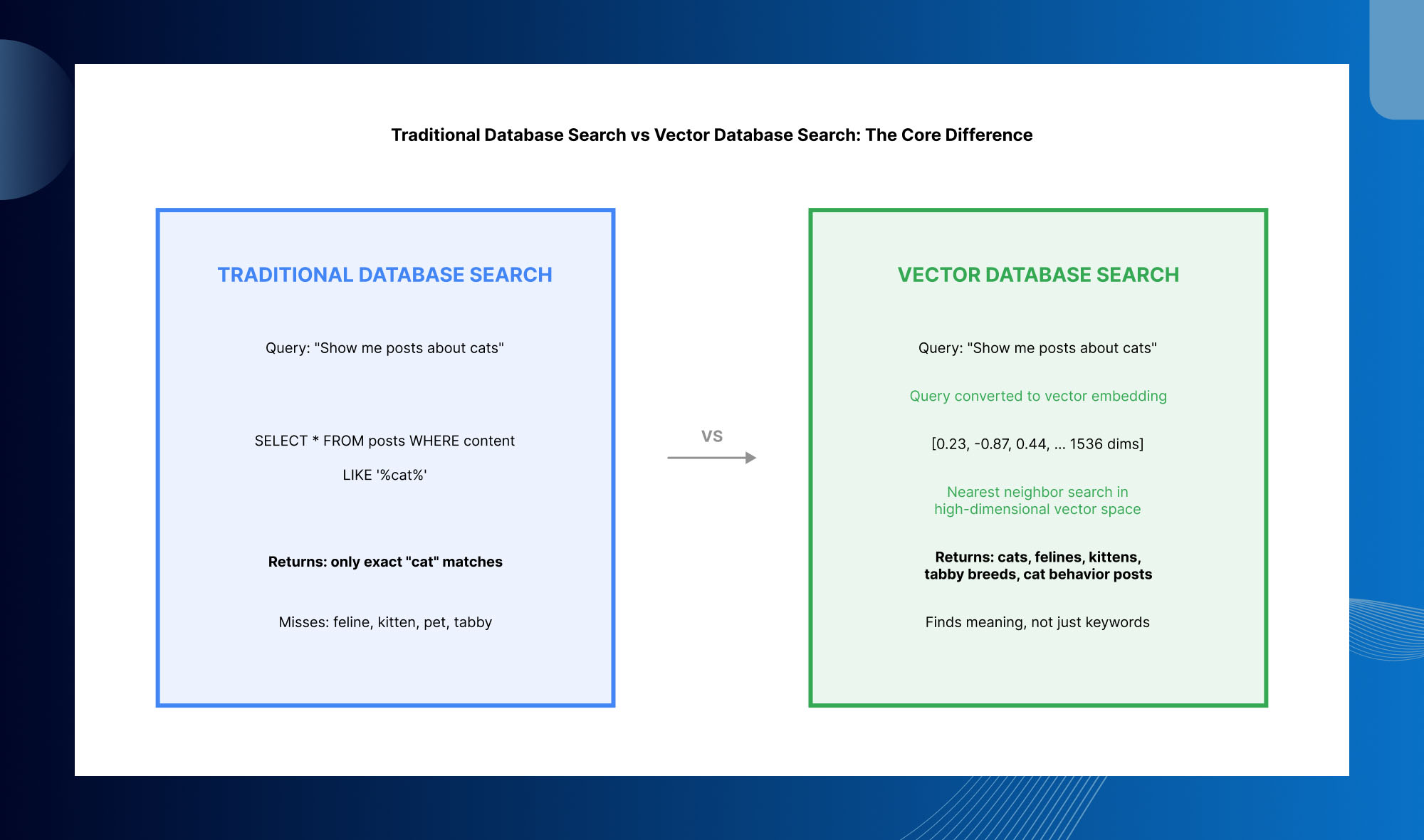
The comparison in the chart above captures the practical difference. A traditional database query for “cats” returns only results that contain the word “cats.” A vector database query for “cats” returns results about cats, felines, kittens, tabby breeds, cat behavior, and cat ownership, because all of those concepts produce embeddings that are close to the “cats” query vector in the embedding space. This semantic understanding is what makes vector databases essential for AI applications that need to understand meaning rather than match syntax.
How a Vector Database Works: The Technical Architecture
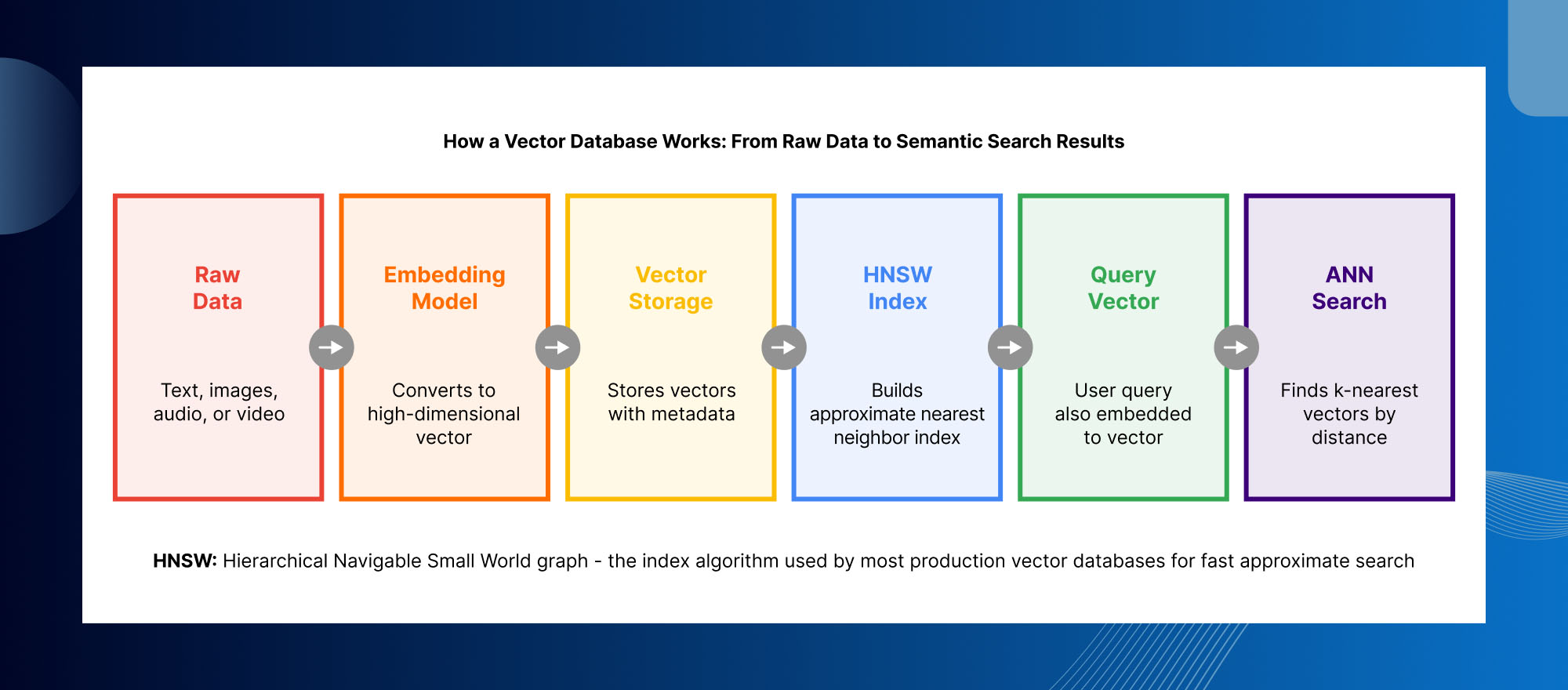
Step 1: Data ingestion and embedding generation
The first step in using a vector database is converting your raw content, whether text documents, images, audio clips, or other data, into vector embeddings using an embedding model. For text, OpenAI’s text-embedding-3-large and text-embedding-3-small, Cohere’s embed-v3, and open-source models like Nomic Embed and BGE are the most widely used options. The choice of embedding model matters because it determines the quality and dimensionality of the vectors stored in the vector database: a better embedding model captures more nuanced semantic relationships and produces more accurate retrieval.
Step 2: Vector storage with metadata
Each embedding is stored in the vector database alongside its original content reference and any associated metadata, such as document title, creation date, author, category, or any other attributes you want to filter on. This metadata becomes important later when you want to combine vector similarity search with structured filtering, for example finding the most similar document to your query among only those published in the last 90 days.
Step 3: Index construction with HNSW
After vectors are stored, the vector database builds an index over them that makes similarity search fast. The dominant indexing algorithm in production vector databases in 2026 is HNSW, which stands for Hierarchical Navigable Small World. HNSW builds a multi-layer graph structure over the stored vectors where nearby vectors are connected, allowing the search algorithm to navigate toward the query vector quickly without comparing against every stored vector exhaustively. The tradeoff in HNSW is between index build time, memory usage, recall (the percentage of true nearest neighbors found), and query speed, and different vector databases expose different parameters for tuning this tradeoff.
Step 4: Approximate nearest neighbor search at query time
When a user submits a query, it goes through the same embedding model that was used for ingestion, producing a query vector. The vector database then runs an approximate nearest neighbor (ANN) search, navigating the HNSW index to find the k stored vectors most similar to the query vector, typically measured by cosine similarity or Euclidean distance. The search returns those k most similar items, ranked by similarity score, along with their associated metadata and content references.
EXACT vs APPROXIMATE NEAREST NEIGHBOR: Vector databases use approximate nearest neighbor search rather than exact nearest neighbor search for an important practical reason: exact nearest neighbor search requires comparing the query vector against every stored vector, which becomes prohibitively slow at millions or tens of millions of vectors. ANN algorithms like HNSW sacrifice a small amount of recall, typically finding 95 to 99 percent of the true nearest neighbors rather than 100 percent, in exchange for query latency that stays under 10 milliseconds even at very large scale. For the vast majority of AI applications, 95 to 99 percent recall is entirely adequate.
Vector Database Use Cases in Production AI Applications
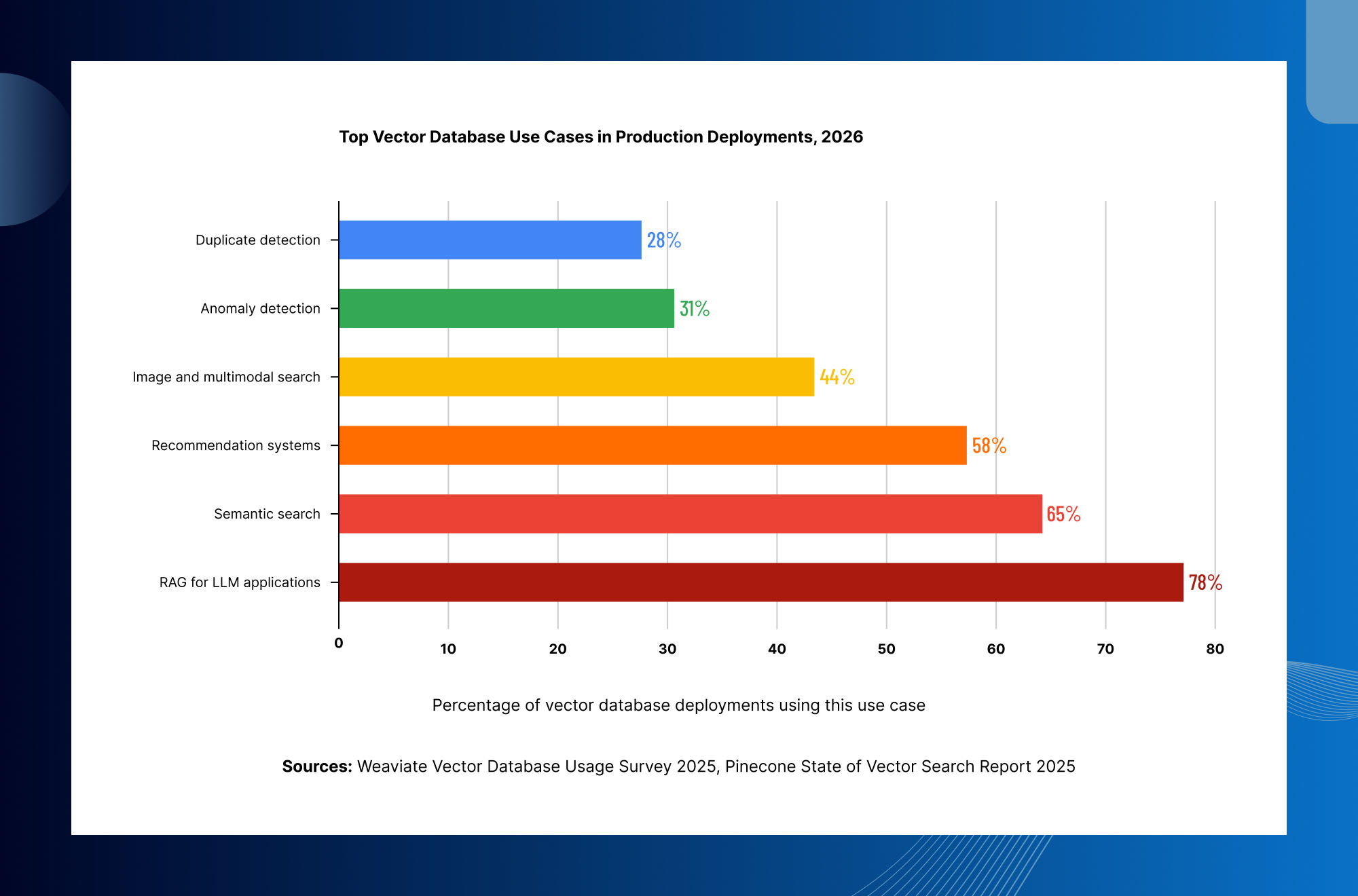
Retrieval Augmented Generation (RAG), 78% of deployments
RAG is the dominant use case for vector databases in 2026, present in 78 percent of production deployments according to Weaviate’s usage survey. In a RAG system, documents are embedded and stored in a vector database. When a user asks a question, the vector database retrieves the most relevant document chunks and they are included in the prompt sent to the LLM, grounding the response in verified, current information rather than the model’s potentially outdated training data. Without a vector database providing fast, accurate retrieval, RAG systems either cannot scale beyond trivial corpus sizes or require prohibitively expensive brute-force search.
Semantic search, 65% of deployments
Semantic search replaces keyword-based enterprise search with meaning-based search that finds relevant content even when the query uses different vocabulary than the stored documents. An employee searching for “how to handle difficult customer interactions” finds results about customer service best practices even if those documents never use the phrase “difficult customer interactions.” Vector databases make this possible by representing both queries and documents as embeddings in the same semantic space.
Recommendation systems, 58% of deployments
Recommendation systems use vector databases to find items similar to ones a user has interacted with or to find users similar to the current user. Product embeddings, content embeddings, and user behavior embeddings are stored in the vector database, and recommendations are generated by finding the nearest neighbors to the current user’s embedding or the item they are currently viewing. Spotify, Netflix, and similar companies use vector similarity search at the core of their recommendation pipelines, though at a scale that typically requires custom infrastructure on top of standard vector database primitives.
Image and multimodal search, 44% of deployments
Multimodal embedding models like CLIP (Contrastive Language-Image Pretraining) can embed both images and text into the same vector space, allowing queries like “find images similar to this photo” or even “find images matching this text description.” E-commerce product search, reverse image search, and visual similarity features are built on multimodal vector databases. Most modern vector databases support storing and querying vectors of any modality, not just text.
Anomaly detection, 31% of deployments
Anomaly detection uses the property that normal patterns in data cluster together in embedding space, while anomalous data points are far from those clusters. Fraud detection systems embed transaction behavior and flag transactions whose embedding is far from the cluster of normal behavior for that user or merchant. Log anomaly detection, network intrusion detection, and industrial sensor anomaly monitoring all apply the same principle using vector databases for efficient similarity and distance computation.
Vector Database Comparison: Pinecone vs Weaviate vs Qdrant vs pgvector vs Milvus
The vector database market in 2026 is genuinely competitive, with meaningfully different options that suit different use cases, team capabilities, and infrastructure requirements. Here is the honest comparison.
Vector Database Comparison: Pinecone vs Weaviate vs Qdrant vs pgvector vs Milvus
| Pinecone | Weaviate | Qdrant | pgvector | Milvus | |
|---|---|---|---|---|---|
| Deployment | Managed only | Managed + self-host | Managed + self-host | Postgres extension | Managed + self-host |
| License | Proprietary | Apache 2.0 | Apache 2.0 | PostgreSQL (open) | Apache 2.0 |
| Hybrid search | Limited | Best in class | Excellent filters | Basic vector + SQL | Good |
| Best scale | Under 100M vectors | Mid-scale, flexible | High throughput | Under 10M vectors | Billions of vectors |
| Unique strength | Fastest managed setup, zero ops | Multimodal data, GraphQL API | Rust performance, best filter speed | Lives in your existing Postgres | Distributed arch, GPU acceleration |
| Pinecone | |
|---|---|
| Deployment | Managed only |
| License | Proprietary |
| Hybrid search | Limited |
| Best scale | Under 100M vectors |
| Unique strength | Fastest managed setup, zero ops |
| Weaviate | |
|---|---|
| Deployment | Managed + self-host |
| License | Apache 2.0 |
| Hybrid search | Best in class |
| Best scale | Mid-scale, flexible |
| Unique strength | Multimodal data, GraphQL API |
| Qdrant | |
|---|---|
| Deployment | Managed + self-host |
| License | Apache 2.0 |
| Hybrid search | Excellent filters |
| Best scale | High throughput |
| Unique strength | Rust performance, best filter speed |
| pgvector | |
|---|---|
| Deployment | Postgres extension |
| License | PostgreSQL (open) |
| Hybrid search | Basic vector + SQL |
| Best scale | Under 10M vectors |
| Unique strength | Lives in your existing Postgres |
| Milvus | |
|---|---|
| Deployment | Managed + self-host |
| License | Apache 2.0 |
| Hybrid search | Good |
| Best scale | Billions of vectors |
| Unique strength | Distributed arch, GPU acceleration |
Pinecone: the first purpose-built managed vector database and still the easiest to get started with. Pinecone is fully managed with no infrastructure to operate, and the serverless pricing model (storage at $0.33 per GB per month plus read and write unit charges) makes it cost-effective at small to medium scale. The tradeoff is no self-hosting option (which matters for data residency requirements), and costs that scale less favorably than self-hosted alternatives above roughly 100 million vectors.
Weaviate: the strongest vector database for hybrid search, combining keyword and semantic search with reciprocal rank fusion for blending result sets. Available as a managed cloud service or self-hosted, open source under Apache 2.0. Weaviate’s GraphQL API and native multimodal support make it the most flexible choice for complex data models. The learning curve around its schema model is steeper than Pinecone, but the capability ceiling is correspondingly higher.
Qdrant: built in Rust and optimized specifically for high-throughput vector search with excellent metadata filtering performance. Qdrant consistently benchmarks ahead of alternatives on filtered query latency, making it the strongest choice for use cases where combining vector similarity with metadata filtering is performance-critical. Available as managed Qdrant Cloud or self-hosted open source.
pgvector: a PostgreSQL extension that adds vector similarity search capabilities to an existing Postgres database. For teams already running Postgres, pgvector allows vectors to live in the same database as the rest of the application data, eliminating a separate service to operate. With HNSW indexing added in 2023, pgvector matches the recall and latency of dedicated vector databases at datasets up to roughly 10 million vectors. Above that scale, dedicated vector databases outperform it significantly.
Milvus: the most mature distributed vector database for very large scale, with an architecture built from the ground up for sharding across many nodes and GPU-accelerated index building. Backed by Zilliz and with 43,000+ GitHub stars, Milvus is the standard choice for datasets in the hundreds of millions or billions of vectors where a single-node vector database would be insufficient. The operational complexity of a distributed Milvus deployment is significant and is best suited to teams with dedicated platform engineering resources.
CHOOSING BETWEEN THESE OPTIONS: If you are starting a new project and your dataset will stay under 50 million vectors, Pinecone for managed simplicity or Weaviate for hybrid search flexibility are the most common starting points. If your team already runs Postgres and your dataset is under 10 million vectors, pgvector is often the right choice because it eliminates a separate service. If performance-critical filtered search is your primary requirement, Qdrant is the strongest technical choice. If you are building at hundreds of millions or billions of vectors, Milvus is the architecture built for that scale.
How to Choose an Embedding Model for Your Vector Database
The embedding model you choose is at least as important as the vector database choice, because it determines the quality of the semantic representations that the vector database stores and searches. A poorly chosen embedding model produces vectors where semantically similar content is not actually close in the vector space, which results in bad retrieval regardless of how well the vector database is configured.
OpenAI text-embedding-3-large: the most widely used embedding model in production RAG systems as of 2026, producing 3072-dimensional vectors (or 1536 when truncated) that achieve state-of-the-art retrieval quality on most English-language benchmarks. The managed API makes it easy to use but introduces a per-token cost and a data residency dependency on OpenAI’s infrastructure.
OpenAI text-embedding-3-small: a smaller, faster, cheaper variant that produces 1536-dimensional vectors with meaningfully lower retrieval quality than the large model. Appropriate for high-volume applications where cost per embedding is a primary constraint and retrieval quality can absorb some degradation.
Cohere embed-v3: strong retrieval quality across multiple languages, making it the standard choice for multilingual RAG systems. Available as a managed API or as a self-hosted model through Cohere’s on-premises offering.
Nomic Embed and BGE models: open-source embedding models that can be run self-hosted, eliminating per-token API costs at the price of infrastructure to run the inference. BGE-M3 in particular achieves competitive retrieval quality to the OpenAI models on many benchmarks while being fully self-hostable.
Vector Database Best Practices for Production Deployments
Chunk your documents deliberately, not arbitrarily: splitting documents into chunks before embedding is necessary because embedding models have token limits (typically 512 to 8192 tokens), but the chunking strategy significantly affects retrieval quality. Chunks that are too short lose context. Chunks that are too long dilute the specific content with surrounding material. Semantic chunking approaches that split at natural topic boundaries outperform fixed-length chunking on most retrieval benchmarks.
Store source content separately from embeddings: always persist the original source documents and the raw text that was embedded independently of the vector database. This allows you to re-embed with a better model without re-processing source documents, switch vector databases without losing your content, and debug retrieval problems by inspecting what content is actually stored.
Implement a retrieval evaluation framework from day one: retrieval quality degrades in ways that are invisible without measurement. As your corpus changes, as user query patterns shift, and as you add new document types, retrieval quality can silently decline. Tools like RAGAS, TruLens, and custom evaluation datasets with known ground truth query-document pairs allow you to measure retrieval quality systematically rather than discovering problems through user complaints.
Use hybrid search when keyword precision matters: pure vector search optimizes for semantic similarity but can miss exact matches that users need. A query for a specific product SKU or a person’s name by exact spelling benefits from keyword search, not vector search. Hybrid search systems that combine vector and keyword search with reciprocal rank fusion consistently outperform either approach alone on diverse real-world query sets.
Design your metadata schema for the filtering queries you will actually run: metadata filtering in vector databases allows you to combine similarity search with structured constraints, but the metadata schema must be designed in advance because adding new metadata fields typically requires re-ingesting documents. Think carefully about what filters your application will need (date ranges, categories, authors, access permissions) and store that metadata at ingestion time.
COMMON VECTOR DATABASE MISTAKE: The most expensive vector database mistake is building a production RAG system with no retrieval evaluation, discovering that retrieval quality is poor, and then attempting to debug the problem across multiple possible causes: chunking strategy, embedding model quality, index configuration, metadata design, and reranking configuration. Without a baseline retrieval evaluation established at the start, you have no way to know which of those variables is responsible for the quality problem or whether a proposed change actually improves it.
Frequently Asked Questions About Vector Databases
Q: What is a vector database and how is it different from a regular database?
A vector database is a specialized database designed to store high-dimensional vector embeddings and find the most similar vectors to a given query using approximate nearest neighbor search. A regular relational database like PostgreSQL stores data in rows and columns and retrieves data by matching exact field values using SQL queries. The fundamental difference is the retrieval mechanism: a regular database finds exact matches, while a vector database finds semantic similarity. Asking a regular database for documents about “my cat” returns only documents containing those exact words. Asking a vector database the same question returns documents about cats, felines, kittens, and cat ownership, because those concepts produce embeddings close to the query in vector space.
Q: What is a vector embedding?
A vector embedding is a list of numbers, typically hundreds or thousands of them, that represents the semantic meaning of a piece of content in a high-dimensional mathematical space. Embedding models, which are neural networks trained on large text or multimodal datasets, convert input content into these numerical vectors such that semantically similar content ends up close together in the vector space. For example, “cat” and “feline” produce embeddings that are very close to each other, while “cat” and “earnings report” produce embeddings that are far apart. Vector databases store these embeddings and find the nearest ones to any given query embedding.
Q: What is RAG and why does it need a vector database?
RAG stands for Retrieval Augmented Generation. It is a technique for giving large language models access to specific, current information by retrieving relevant documents at query time and including them in the prompt. A vector database is essential for RAG because it allows the retrieval step to find semantically relevant documents from a large corpus quickly, even when the query uses different vocabulary than the stored documents. Without a vector database, RAG systems either cannot scale beyond trivial corpus sizes or require prohibitively slow brute-force search across every document for every query.
Q: What is HNSW and why do vector databases use it?
HNSW stands for Hierarchical Navigable Small World. It is the graph-based index algorithm used by most production vector databases to make approximate nearest neighbor search fast at scale. HNSW builds a multi-layer graph structure where vectors are connected to their neighbors, allowing the search algorithm to navigate toward the query vector efficiently without comparing against every stored vector. The result is query latency under 10 milliseconds even at tens of millions of vectors, at the cost of some recall, typically 95 to 99 percent of true nearest neighbors found rather than 100 percent. For nearly all AI applications, this recall level is adequate and the speed benefit is essential.
Q: Should I use Pinecone, Weaviate, Qdrant, pgvector, or Milvus?
The right vector database depends on your use case, scale, and infrastructure requirements. Pinecone is the easiest managed option for getting started quickly with no infrastructure to operate, best suited for datasets under 100 million vectors. Weaviate is the strongest choice for hybrid search combining semantic and keyword search, available as managed or self-hosted. Qdrant excels at high-throughput filtered vector search, written in Rust for maximum performance. pgvector is the right choice if you already run PostgreSQL and your dataset is under 10 million vectors, since it eliminates a separate service. Milvus is built for hundreds of millions or billions of vectors with a distributed architecture, but carries significant operational complexity.
Q: How much does a vector database cost in production?
Vector database costs vary significantly by provider and scale. Pinecone charges $0.33 per GB per month for serverless storage plus read and write unit charges, typically costing $70 to $100 per month at 10 million vectors with moderate traffic, rising to $700 or more at 100 million vectors. Weaviate Cloud and Qdrant Cloud have similar managed pricing models. Self-hosted alternatives like Weaviate, Qdrant, and Milvus have no licensing cost but require GPU or high-memory compute instances to run, which typically cost $500 to $2,000 per month depending on scale for a production-grade deployment. pgvector adds no cost beyond the existing PostgreSQL infrastructure if you already run Postgres.
Vector Databases Are the Retrieval Layer of Modern AI
A vector database is the component that gives AI applications access to specific, relevant information at query time. Without it, large language models can only draw on their training data, which is static, potentially outdated, and incapable of knowing anything specific to your organization. With a well-designed vector database and retrieval pipeline, an LLM can accurately answer questions about your internal documentation, your product catalog, your customer history, or any other corpus of information you choose to embed and store.
The choice between Pinecone, Weaviate, Qdrant, pgvector, and Milvus is a real decision with real consequences for cost, performance, and operational overhead. But the more fundamental decision is whether to invest in the retrieval evaluation and monitoring infrastructure that makes any of these choices work reliably in production over time. A vector database without retrieval evaluation is a black box that you cannot improve systematically. With it, every retrieval quality problem becomes diagnosable and fixable.
At Trantor, we design and build production vector database systems as part of our AI engineering practice, from initial embedding model selection and chunking strategy through vector database configuration, hybrid search implementation, and retrieval evaluation frameworks. We have built RAG systems on Pinecone, Weaviate, Qdrant, and pgvector across use cases from enterprise document search to multimodal product search, and we bring that implementation experience to help you make the right vector database choice and build it correctly the first time. If you are building an AI application that needs reliable retrieval, we are ready to help.
Explore Trantor’s AI Engineering Services: Artificial Intelligence