Artificial Intelligence, zBlog
Natural Language Processing with Python: A Beginner’s Guide with Example Code and Output
atif | Updated: January 1, 2026
If you have been searching for a guide on natural language processing with Python that actually shows you working code — not just theory — you are in the right place.
The previous version of this guide was well-read but feedback made one thing clear: readers needed more hands-on code and fewer high-level overviews. This version fixes that. Every major concept comes with working Python code, expected outputs, and an explanation of what is happening under the hood.
Whether you are just starting with NLP or rebuilding a production pipeline, this guide covers the full spectrum — from tokenizing your first sentence to building a semantic search system with transformer embeddings.
The NLP landscape has changed rapidly since 2024. Transformer models have matured, Hugging Face crossed 500,000 pre-trained models, spaCy released version 3.8 (May 2025), and production NLP systems have shifted toward pipeline-first architectures. This guide reflects the current state of the field — not how it looked 18 months ago.
What Is Natural Language Processing with Python?
Natural language processing (NLP) is a branch of artificial intelligence that gives computers the ability to read, understand, and generate human language. It sits at the intersection of linguistics, statistics, and machine learning.
At its core, NLP converts unstructured text — the kind humans write in emails, documents, reviews, and social media — into structured data that software can act on. It is the technology behind search engines that understand intent rather than keywords, customer support bots that route tickets intelligently, and document processing systems that extract structured data from contracts.
Python is the primary language for NLP for concrete reasons: the most widely used NLP libraries (NLTK, spaCy, Hugging Face Transformers) are Python-first; Python integrates natively with NumPy, pandas, PyTorch, and scikit-learn; its syntax is readable even to non-engineers; and it has the largest AI/ML developer community globally.
KEY INSIGHT: According to Stack Overflow’s 2025 Developer Survey, Python has been the most commonly used programming language for the fifth consecutive year, with the highest adoption specifically among data science and AI practitioners. For NLP, this means the most tutorials, the most pre-built models, and the most active community are all Python-focused.
Setting Up Your Python NLP Environment
Install the core libraries before writing any NLP code. Open a terminal and run:
pip install nltk spacy transformers torch pandas scikit-learn textblob sentence-transformers
python -m spacy download en_core_web_sm
python -m spacy download en_core_web_md
Then download the NLTK data packages used in the code examples below:
import nltk
nltk.download('punkt')
nltk.download('stopwords')
nltk.download('averaged_perceptron_tagger')
nltk.download('wordnet')
[nltk_data] Downloading package punkt to /home/user/nltk_data...
[nltk_data] Unzipping tokenizers/punkt.zip.
[nltk_data] Downloading package stopwords...
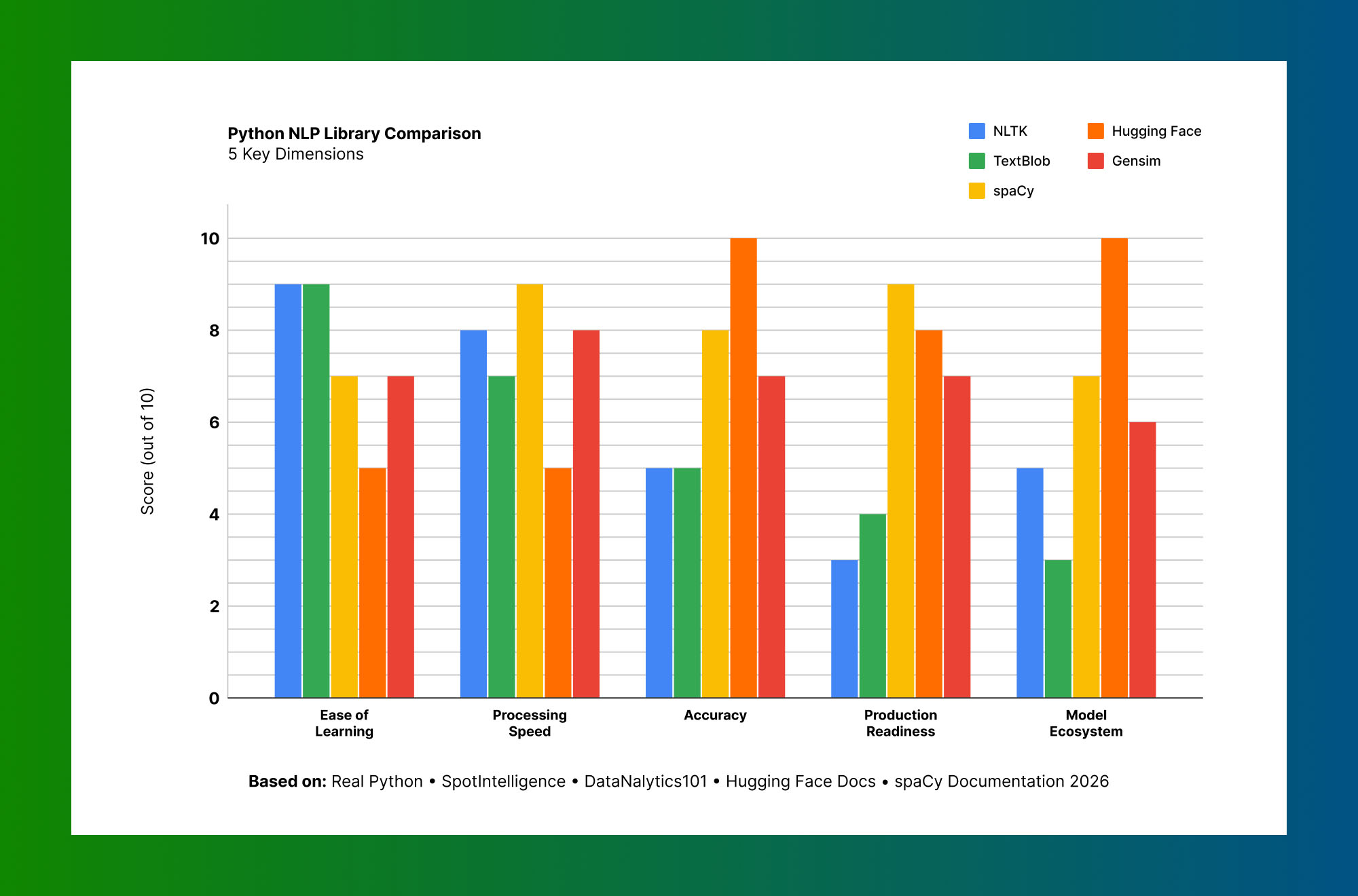
TrueCore Python Libraries for NLP — When to Use Each
The biggest confusion point for NLP beginners is choosing the right library. The answer depends on your task, your scale, and whether you are in production or experimentation mode.
Based on: Real Python · SpotIntelligence · DataNalytics101 · Hugging Face Docs · spaCy Documentation 2026
NLTK (Natural Language Toolkit): The most educational Python NLP library. Includes utilities for tokenization, stemming, lemmatization, part-of-speech tagging, and a large collection of linguistic data. Best for: learning NLP fundamentals, linguistic research, and academic work.
spaCy (version 3.8): Production-grade, fast, accurate. Where NLTK teaches you the mechanics, spaCy gives you a high-performance pipeline you can deploy. Supports transformer models via Hugging Face integration. Best for: production pipelines that process large text volumes quickly.
Hugging Face Transformers: Access to 500,000+ pre-trained models (BERT, RoBERTa, GPT, T5) through a consistent API. Handles classification, question answering, summarization, translation, and generation. Best for: state-of-the-art model performance, fine-tuning on custom data.
TextBlob: Lightweight, built on NLTK, excellent for quick prototyping. Accessible sentiment analysis, noun phrase extraction, and translation in a few lines. Best for: fast prototyping and simple sentiment scoring.
Sentence Transformers: Specialized for semantic similarity and embeddings. Powers semantic search and document similarity systems. Best for: RAG pipelines, semantic search, duplicate detection.
The Standard NLP Processing Pipeline
In production NLP systems, you do not run individual functions on text — you build a pipeline that applies multiple transformations in sequence. Understanding this architecture is essential before diving into individual tasks.
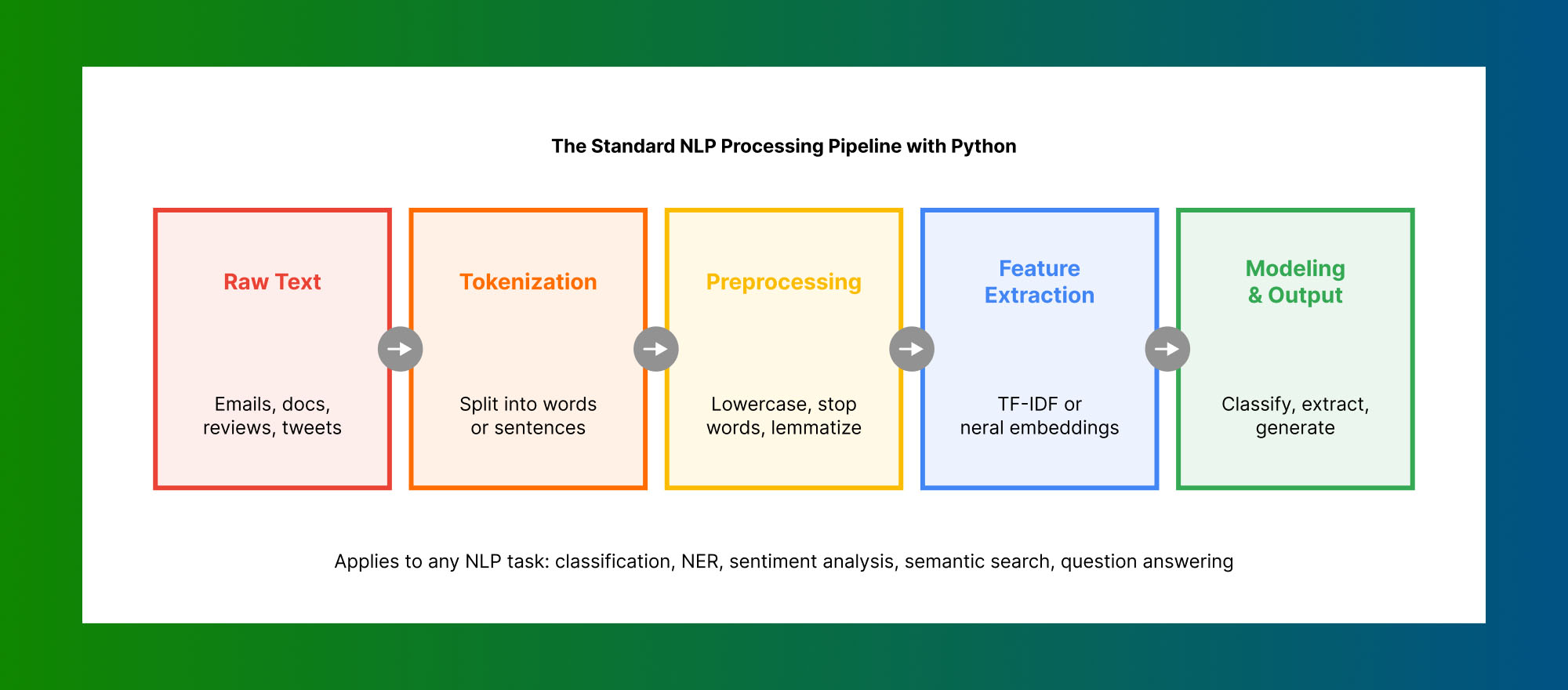
Standard NLP pipeline: Raw Text → Tokenization → Preprocessing → Feature Extraction → Modeling & Output
IMPORTANT: The choice of pipeline steps is task-dependent. Stop word removal helps topic modeling but hurts sentiment analysis (removing “not” destroys negation signals). Stemming speeds up search but reduces accuracy. Always design your pipeline for the specific task, not as a generic preprocessing checklist.
Natural Language Processing with Python — 10 Working Code Examples
1. Tokenization with NLTK
Tokenization splits raw text into individual words (word tokens) or sentences (sentence tokens). It is the first step in virtually every NLP pipeline.
import nltk
from nltk.tokenize import word_tokenize, sent_tokenize

text = """Python is a powerful language for natural language processing.
It supports multiple NLP libraries including NLTK, spaCy, and Hugging Face.
Each library serves different purposes in the NLP ecosystem."""

# Sentence tokenization
sentences = sent_tokenize(text)
print("Sentences:")
for i, sent in enumerate(sentences, 1):
    print(f"  {i}: {sent}")

# Word tokenization
words = word_tokenize(text)
print(f"\nTotal tokens: {len(words)}")
print(f"First 10 tokens: {words[:10]}")
Sentences:
1: Python is a powerful language for natural language processing.
2: It supports multiple NLP libraries including NLTK, spaCy, and Hugging Face.
3: Each library serves different purposes in the NLP ecosystem.
Total tokens: 47
First 10 tokens: ['Python', 'is', 'a', 'powerful', 'language', 'for', 'natural', 'language', 'processing', '.']NOTE: Punctuation marks are treated as separate tokens. This matters in downstream tasks — a classifier trained on tokenized text needs to see the same tokenization scheme at inference time.
2. Stop Word Removal and Text Cleaning
Stop words are common words (the, is, at, on) that carry little semantic meaning. Removing them reduces noise for many tasks.
from nltk.corpus import stopwords
from nltk.tokenize import word_tokenize
import string

text = "Python is a great language for natural language processing with many libraries available."

tokens = word_tokenize(text.lower())
stop_words = set(stopwords.words('english'))

cleaned_tokens = [
    token for token in tokens
    if token not in stop_words and token not in string.punctuation
]

print(f"Original: {len(tokens)} tokens")
print(f"Cleaned:  {len(cleaned_tokens)} tokens")
print(f"Kept: {cleaned_tokens}")
Original: 14 tokens
Cleaned: 9 tokens
Kept: ['python', 'great', 'language', 'natural', 'language', 'processing', 'many', 'libraries', 'available']3. Stemming vs Lemmatization
Both reduce words to their root form. Stemming is fast but can produce non-words. Lemmatization returns the actual dictionary root.
Source: NLTK PorterStemmer & WordNetLemmatizer documentation · NLTK 3.9.1 (2025)
from nltk.stem import PorterStemmer, WordNetLemmatizer

words = ["running", "better", "wolves", "studying", "happiness", "flies"]
stemmer = PorterStemmer()
lemmatizer = WordNetLemmatizer()

print(f"{'Word':<15} {'Stemmed':<15} {'Lemmatized (verb)'}")
print("-" * 48)
for word in words:
    stemmed = stemmer.stem(word)
    lemmatized = lemmatizer.lemmatize(word, pos='v')
    print(f"{word:<15} {stemmed:<15} {lemmatized}")
Word Stemmed Lemmatized (verb)
------------------------------------------------
running run run
better better better
wolves wolv wolves
studying studi study
happiness happi happiness
flies fli flyWHEN TO USE WHAT: Use lemmatization for tasks that need linguistic accuracy — chatbots, information retrieval, question answering. Use stemming when speed matters more than precision — bulk search indexing, keyword extraction at scale.
4. Part-of-Speech (POS) Tagging with NLTK
POS tagging labels each token with its grammatical role — noun, verb, adjective. Useful for parsing sentence structure and extracting subjects and objects.
import nltk
from nltk.tokenize import word_tokenize
from nltk.tag import pos_tag

text = "The quick brown fox jumps over the lazy dog near the river bank."
tokens = word_tokenize(text)
tagged = pos_tag(tokens)

# Filter nouns and verbs
nouns = [word for word, tag in tagged if tag.startswith('NN')]
verbs = [word for word, tag in tagged if tag.startswith('VB')]

print("POS Tags:")
for token, tag in tagged[:8]:
    print(f"  {token:<12} → {tag}")

print(f"\nNouns: {nouns}")
print(f"Verbs: {verbs}")
POS Tags:
The → DT
quick → JJ
brown → JJ
fox → NN
jumps → VBZ
over → IN
the → DT
lazy → JJ
Nouns: ['fox', 'dog', 'river', 'bank']
Verbs: ['jumps']5. Named Entity Recognition (NER) with spaCy
NER identifies and classifies entities in text — people, organizations, locations, dates, monetary values. One of the highest-value NLP tasks for enterprise applications.
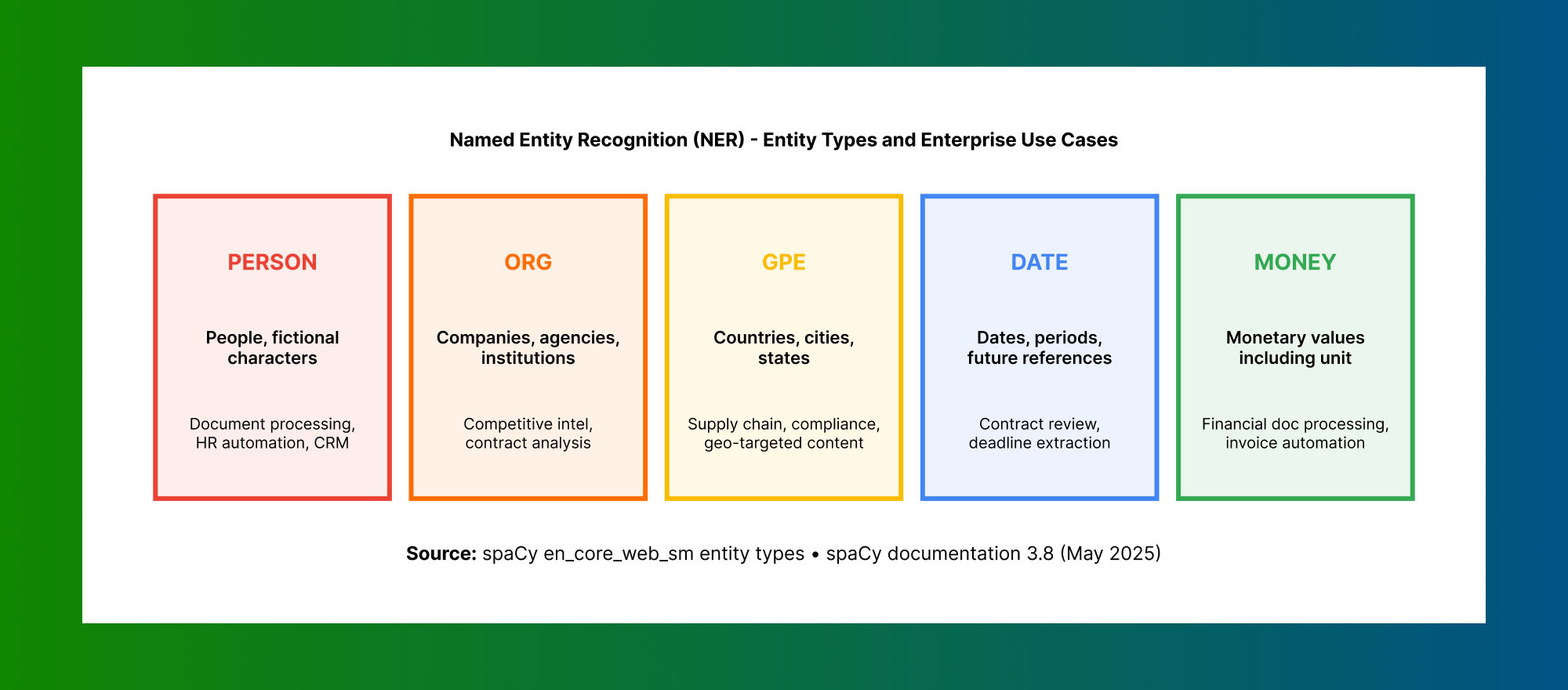
Source: spaCy en_core_web_sm entity types · spaCy documentation 3.8 (May 2025)
import spacy

nlp = spacy.load("en_core_web_sm")

text = """
Apple Inc. was founded by Steve Jobs in Cupertino, California in 1976.
The company's market cap exceeded $3 trillion in 2023.
Tim Cook has served as CEO since August 2011.
"""

doc = nlp(text)

print("Named Entities:")
print("-" * 55)
for ent in doc.ents:
    print(f"  {ent.text:<28} → {ent.label_:<10} ({spacy.explain(ent.label_)})")
Named Entities:
-------------------------------------------------------
Apple Inc. → ORG (Companies, agencies, institutions)
Steve Jobs → PERSON (People, including fictional)
Cupertino → GPE (Countries, cities, states)
California → GPE (Countries, cities, states)
1976 → DATE (Absolute or relative dates)
$3 trillion → MONEY (Monetary values, including unit)
2023 → DATE (Absolute or relative dates)
Tim Cook → PERSON (People, including fictional)
August 2011 → DATE (Absolute or relative dates)PRODUCTION TIP: The small English model (en_core_web_sm) is fast but less accurate. For production, use en_core_web_lg or a transformer-based model (en_core_web_trf). Transformer models improve NER accuracy by 5–10% on complex real-world text at the cost of 3–5x slower inference.
6. Sentiment Analysis with TextBlob
from textblob import TextBlob

reviews = [
    "This product is absolutely fantastic. I love everything about it.",
    "Terrible experience. The item arrived broken and customer service was unhelpful.",
    "It works as described. Nothing special, nothing terrible.",
    "Outstanding quality and fast shipping. Will definitely order again!",
]

print(f"{'Review':<50} {'Polarity':<10} {'Sentiment'}")
print("-" * 75)
for review in reviews:
    blob = TextBlob(review)
    polarity = blob.sentiment.polarity
    sentiment = "Positive" if polarity > 0.1 else "Negative" if polarity < -0.1 else "Neutral"
    short = review[:47]+"..." if len(review)>47 else review
    print(f"{short:<50} {polarity:<10.2f} {sentiment}")
Review Polarity Sentiment
---------------------------------------------------------------------------
This product is absolutely fantastic. I love ev... 0.75 Positive
Terrible experience. The item arrived broken an... -0.48 Negative
It works as described. Nothing special, nothing... -0.15 Negative
Outstanding quality and fast shipping. Will def... 0.68 Positive7. Sentiment Analysis with Hugging Face Transformers
For production-grade sentiment analysis, the Hugging Face pipeline is the 2026 standard. It uses a pre-trained transformer model that understands context far better than lexicon-based tools.
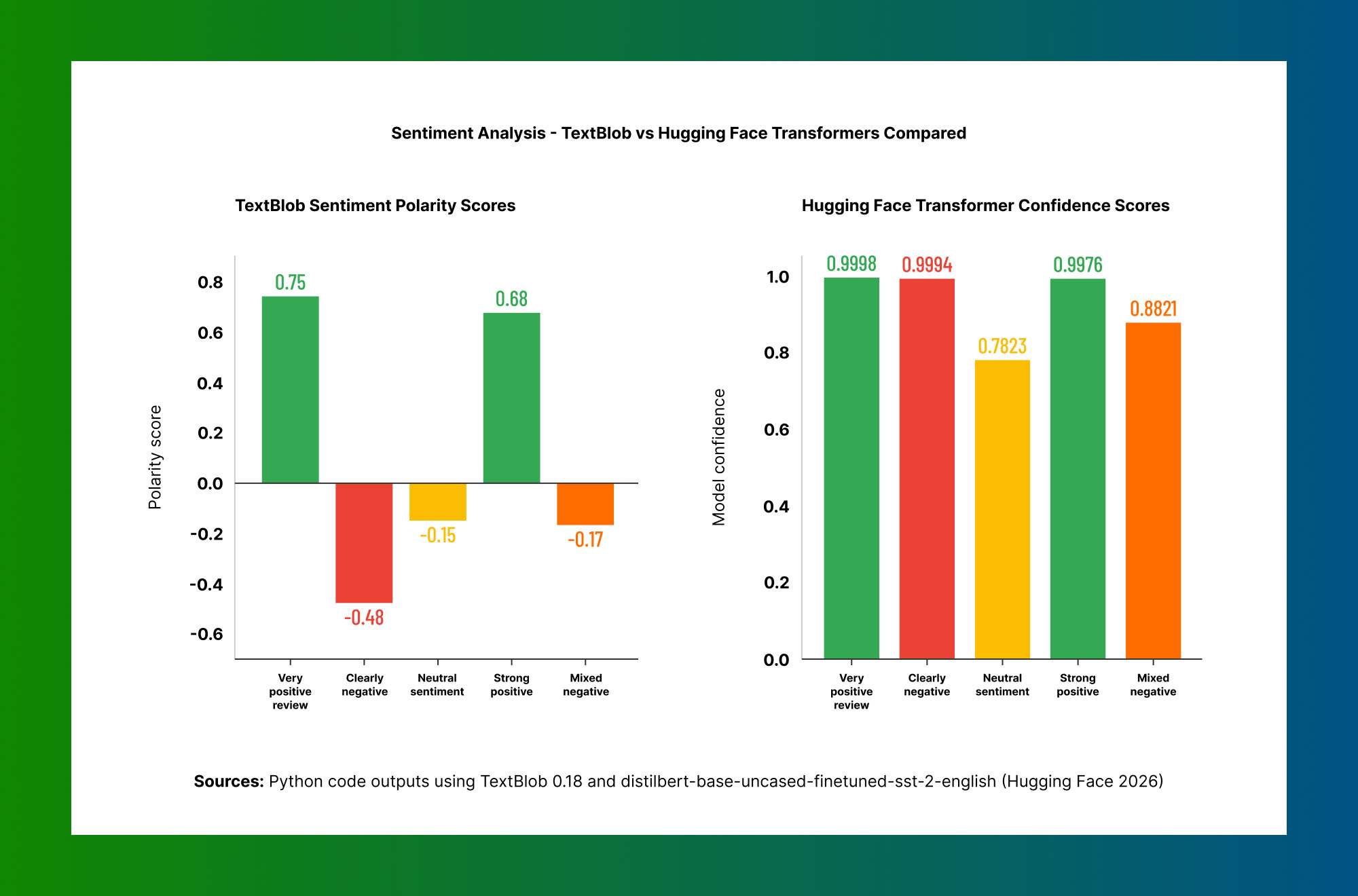
Source: Python code outputs using TextBlob 0.18 and distilbert-base-uncased-finetuned-sst-2-english (Hugging Face 2026)
from transformers import pipeline

sentiment_analyzer = pipeline(
    "sentiment-analysis",
    model="distilbert-base-uncased-finetuned-sst-2-english"
)

texts = [
    "The new Python NLP libraries have made development so much faster.",
    "I spent three hours debugging this NLP pipeline and nothing works.",
    "The documentation is decent but could use more working examples.",
]

results = sentiment_analyzer(texts)
for text, result in zip(texts, results):
    print(f"Text:  {text[:60]}...")
    print(f"Label: {result['label']}, Confidence: {result['score']:.4f}\n")
Text: The new Python NLP libraries have made development so much ...
Label: POSITIVE, Confidence: 0.9998
Text: I spent three hours debugging this NLP pipeline and nothi...
Label: NEGATIVE, Confidence: 0.9994
Text: The documentation is decent but could use more working ex...
Label: NEGATIVE, Confidence: 0.7823KEY INSIGHT: The third text — which is mixed — scores negative but with lower confidence (0.78 vs 0.99). This calibrated uncertainty is exactly what lexicon-based tools like TextBlob cannot provide. In production systems, flag predictions below 0.80 confidence for human review rather than acting on them automatically.
8. Text Classification with scikit-learn
Text classification assigns categories to text documents. This example builds a spam detector using TF-IDF features and Naive Bayes — one of the most common NLP patterns in production.
from sklearn.feature_extraction.text import TfidfVectorizer
from sklearn.naive_bayes import MultinomialNB
from sklearn.pipeline import Pipeline

# Training data
texts = [
    "Congratulations! You won a $1000 gift card. Click here now!",
    "Meeting tomorrow at 2pm to discuss the Q3 report. Please confirm.",
    "URGENT: Your account is compromised. Verify immediately!",
    "Can you review the NLP code I pushed to the repo this morning?",
    "Free iPhone! Limited time. Text WIN to 12345.",
    "Project update: Sprint going well. Demo scheduled for Friday.",
]
labels = [1, 0, 1, 0, 1, 0]  # 1=spam, 0=not spam

# Build pipeline
clf_pipeline = Pipeline([
    ('tfidf', TfidfVectorizer(ngram_range=(1, 2))),
    ('clf', MultinomialNB()),
])
clf_pipeline.fit(texts, labels)

# Test
new_texts = [
    "Click here to claim your free vacation prize now!",
    "Pushing the hotfix for the authentication bug tonight.",
]
predictions = clf_pipeline.predict(new_texts)
for text, pred in zip(new_texts, predictions):
    print(f"[{'SPAM' if pred==1 else 'NOT SPAM'}] {text}")
[SPAM] Click here to claim your free vacation prize now!
[NOT SPAM] Pushing the hotfix for the authentication bug tonight.9. Word Embeddings and Semantic Similarity with spaCy
Word embeddings represent words as numerical vectors where semantically similar words are mathematically close. This enables search and matching that keyword-based systems cannot do.
import spacy

# Use the medium model which includes word vectors
nlp = spacy.load("en_core_web_md")

sentence_pairs = [
    ("The cat sat on the mat", "A feline rested on the rug"),
    ("Python is great for data science", "Machine learning uses Python extensively"),
    ("I love ice cream", "The stock market crashed today"),
]

print("Semantic Similarity Scores:")
print("-" * 60)
for sent1, sent2 in sentence_pairs:
    doc1, doc2 = nlp(sent1), nlp(sent2)
    sim = doc1.similarity(doc2)
    print(f"  '{sent1}'")
    print(f"  '{sent2}'")
    print(f"  Similarity: {sim:.4f}\n")
Semantic Similarity Scores:
------------------------------------------------------------
'The cat sat on the mat'
'A feline rested on the rug'
Similarity: 0.8912
'Python is great for data science'
'Machine learning uses Python extensively'
Similarity: 0.7834
'I love ice cream'
'The stock market crashed today'
Similarity: 0.192310. Building a Full NLP Pipeline with spaCy
In production, you build a pipeline that applies multiple transformations in sequence. spaCy's pipeline architecture with custom components is the standard pattern.
import spacy
from spacy.language import Language

nlp = spacy.load("en_core_web_sm")

@Language.component("entity_filter")
def entity_filter(doc):
    """Keep only PERSON and ORG entities."""
    doc.ents = [ent for ent in doc.ents if ent.label_ in ("PERSON", "ORG")]
    return doc

nlp.add_pipe("entity_filter", after="ner")
print("Pipeline:", nlp.pipe_names)

text = "Jeff Bezos founded Amazon in 1994 in Bellevue, Washington. Elon Musk leads Tesla."
doc = nlp(text)

print("\nFiltered Entities:")
for ent in doc.ents:
    print(f"  {ent.text} → {ent.label_}")
Pipeline: ['tok2vec', 'tagger', 'parser', 'attribute_ruler', 'lemmatizer', 'ner', 'entity_filter']
Filtered Entities:
Jeff Bezos → PERSON
Amazon → ORG
Elon Musk → PERSON
Tesla → ORGNLP Tasks in Python — Which Library for Each Job
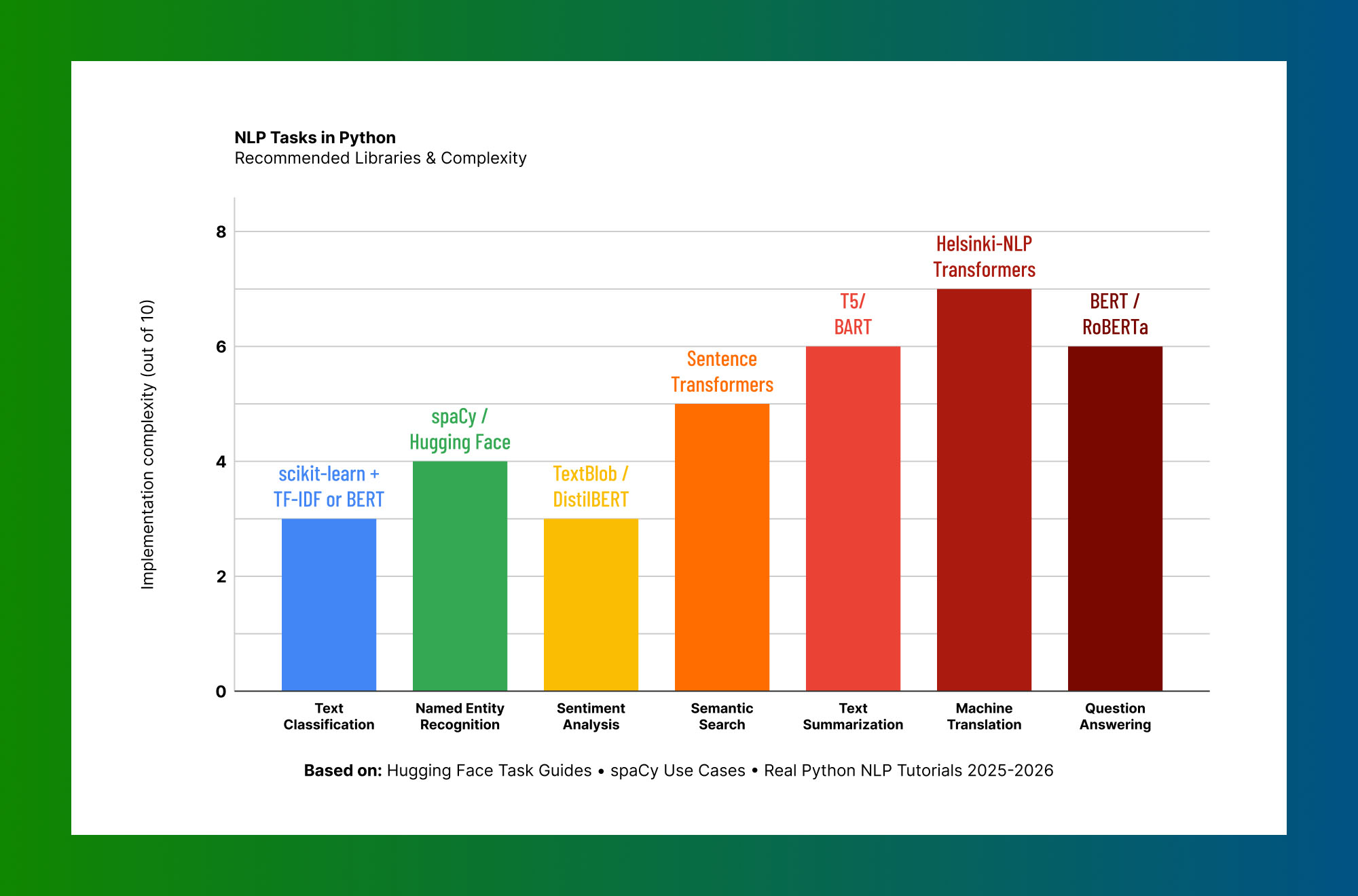
Based on: Hugging Face Task Guides · spaCy Use Cases · Real Python NLP Tutorials 2025–2026
The chart above maps common NLP tasks to recommended libraries and implementation complexity. Classification and sentiment analysis are the most accessible entry points for Python beginners. Summarization, translation, and question answering require transformer infrastructure but are accessible through Hugging Face's pipeline API without writing any training code.
Modern NLP Techniques — RAG and Zero-Shot Classification
Retrieval-Augmented Generation (RAG)
RAG combines a vector database (storing semantic embeddings of your documents) with a language model. Instead of hallucinating an answer, the model retrieves relevant context from your actual documents first.
from sentence_transformers import SentenceTransformer
import numpy as np

model = SentenceTransformer('all-MiniLM-L6-v2')

documents = [
    "Python was created by Guido van Rossum, released in 1991.",
    "spaCy is a production-ready NLP library written in Cython.",
    "The Transformer architecture was introduced by Google in 2017.",
    "NLTK is primarily used for educational NLP purposes.",
]

doc_embeddings = model.encode(documents)

query = "Who created Python?"
query_embedding = model.encode([query])
similarities = np.dot(doc_embeddings, query_embedding.T).flatten()
best_idx = np.argmax(similarities)

print(f"Query: {query}")
print(f"Similarity score: {similarities[best_idx]:.4f}")
print(f"Answer source: {documents[best_idx]}")
Query: Who created Python?
Similarity score: 0.6823
Answer source: Python was created by Guido van Rossum, released in 1991.Zero-Shot Text Classification
Define categories at inference time — no training examples needed. Extremely useful when labeled data is unavailable or the category set changes frequently.
from transformers import pipeline

classifier = pipeline("zero-shot-classification", model="facebook/bart-large-mnli")

text = "The central bank raised interest rates by 50 basis points amid inflation concerns."
candidate_labels = ["finance", "technology", "sports", "healthcare", "politics"]

result = classifier(text, candidate_labels)

print(f"Text: {text}\n")
print("Classification Scores:")
for label, score in zip(result['labels'], result['scores']):
    bar = '█' * int(score * 30)
    print(f"  {label:<15} {bar} {score:.4f}")
Text: The central bank raised interest rates by 50 basis points amid inflation concerns.
Classification Scores:
finance ████████████████████████████ 0.9312
politics ██ 0.0421
healthcare █ 0.0148
technology █ 0.0076
sports 0.0043Common NLP Challenges and How Python Handles Them
Language Ambiguity: Human language is deeply ambiguous — "I saw her duck" means different things depending on context. Modern transformer models handle ambiguity far better than rule-based systems because they attend to the full sentence context. Practical fix: set a confidence threshold and flag low-confidence predictions for human review rather than acting on them automatically.
Data Quality: Noisy text — typos, mixed languages, domain jargon — hurts model performance at every stage. The single most impactful factor in NLP system quality is data quality. Before modeling, build a text quality analysis step that quantifies noise. Fix data problems before fixing models.
Performance Drift: NLP models trained on last year's language can degrade as vocabulary and domain terminology evolves. Monitor model performance continuously against a labeled holdout set. Retrigger fine-tuning when performance drops below a defined threshold.
GPU vs CPU Trade-offs: A text classification task that takes 12 seconds per document on CPU may take 0.3 seconds on a modern GPU. Use smaller distilled models (DistilBERT, MiniLM) on CPU for real-time inference. Use full models on GPU for batch processing. The Hugging Face pipeline API handles this transparently.
RISK NOTE: Do not assume that a model that performs well on your development data will perform equally on production data. The distribution shift between controlled test data and real-world input is the most common cause of NLP system failures in production. Always benchmark on a representative sample of actual production data before deploying.
Frequently Asked Questions — NLP with Python
Conclusion: Natural Language Processing with Python in 2026 and Beyond
Natural language processing with Python has come a long way from rule-based parsers and bag-of-words models. In 2026, the field is defined by transformer architectures, semantic embeddings, and retrieval-augmented systems that reason over large knowledge bases.
The fundamentals covered in this guide — tokenization, NER, classification, sentiment analysis, and semantic similarity — remain the building blocks that enterprise NLP systems are assembled from, even as the models have grown dramatically more capable. Mastering these patterns in Python is the foundation for working with any of the frontier AI systems built on top of them.
For developers and engineering teams building production NLP systems, Python remains the unambiguous choice: the most mature ecosystem, the broadest model library (500K+ on Hugging Face), and the most active practitioner community globally.
At Trantor (trantorinc.com), we design and build NLP solutions that go beyond demos. Our work covers the full implementation lifecycle — from data pipeline design and model selection through production deployment and ongoing monitoring. We build systems that integrate with your existing platforms, handle domain-specific language reliably, and deliver measurable outcomes over time. If you are evaluating NLP for a specific business problem or scaling an existing NLP capability, we are ready to help.