Web Development, zBlog
JADE (Java Agent Development Framework) — A Practical Guide for Java Developers
trantorindia | Updated: July 12, 2026
JADE, which stands for Java Agent Development Framework, is the most widely adopted open-source platform for building multi-agent systems in Java. If you are searching for JADE, the java agent development framework, you are most likely building or evaluating a distributed system where multiple autonomous agents need to discover each other, communicate, and coordinate decisions without centralized control. JADE handles all of that infrastructure so your team can focus on the agent behaviors themselves rather than the plumbing that connects them.
What sets JADE apart from other multi-agent frameworks is not just its maturity, it has been in active development since 1999 and is backed by Telecom Italia (now TIM), but its compliance with the FIPA specification. FIPA, the Foundation for Intelligent Physical Agents, defines the interoperability standards for multi-agent communication that most enterprise and research projects require. JADE is the only open-source multi-agent framework that is fully FIPA certified, which matters the moment your agents need to communicate with systems built on other platforms or comply with industry specifications.
This guide covers everything you need to use the JADE java agent development framework in production: the core architecture, how agents are created and managed, how they communicate using ACL messages, working Java code examples you can run immediately, real-world use cases across industries, and an honest comparison against Repast, SPADE, and AnyLogic so you can make an informed framework decision.
JADE is not just a research tool. It powers production systems in telecommunications, supply chain management, smart grid energy coordination, IoT device orchestration, and financial trading. Its agent lifecycle, FIPA-compliant messaging, and distributed container architecture make it a practical choice for any system that needs multiple autonomous software entities working together at enterprise scale.
What Is JADE? Understanding the Java Agent Development Framework
JADE is an open-source middleware framework written in Java that simplifies the development of multi-agent systems by providing a complete runtime environment, a rich class library, and a set of graphical tools for debugging and monitoring agent behavior. It was originally developed by Telecom Italia Labs and is distributed under the LGPL 2 license, meaning you can use it freely in commercial projects.
The core idea behind the JADE java agent development framework is that complex problems are better solved by multiple specialized agents that can coordinate autonomously than by a single monolithic application. Each agent in a JADE system is a self-contained entity with its own thread, its own behavior logic, and its own identity on the network. Agents can be started, paused, moved between machines, and killed independently without affecting the rest of the system.
What makes JADE different from simply writing multithreaded Java code: JADE provides a standardized way for agents to find each other using the Directory Facilitator, a standard protocol for them to communicate using FIPA ACL messages, a lifecycle management system through the Agent Management System, and tools to distribute agents across multiple JVMs and physical machines seamlessly. Building all of this from scratch in plain Java would take months. JADE provides it as a stable, tested foundation.
JADE Java Agent Development Framework: Architecture Deep Dive
Understanding the JADE architecture is essential before you write any agent code, because the architecture determines how your agents find each other, how they communicate, and how you deploy them across machines.
The JADE Platform
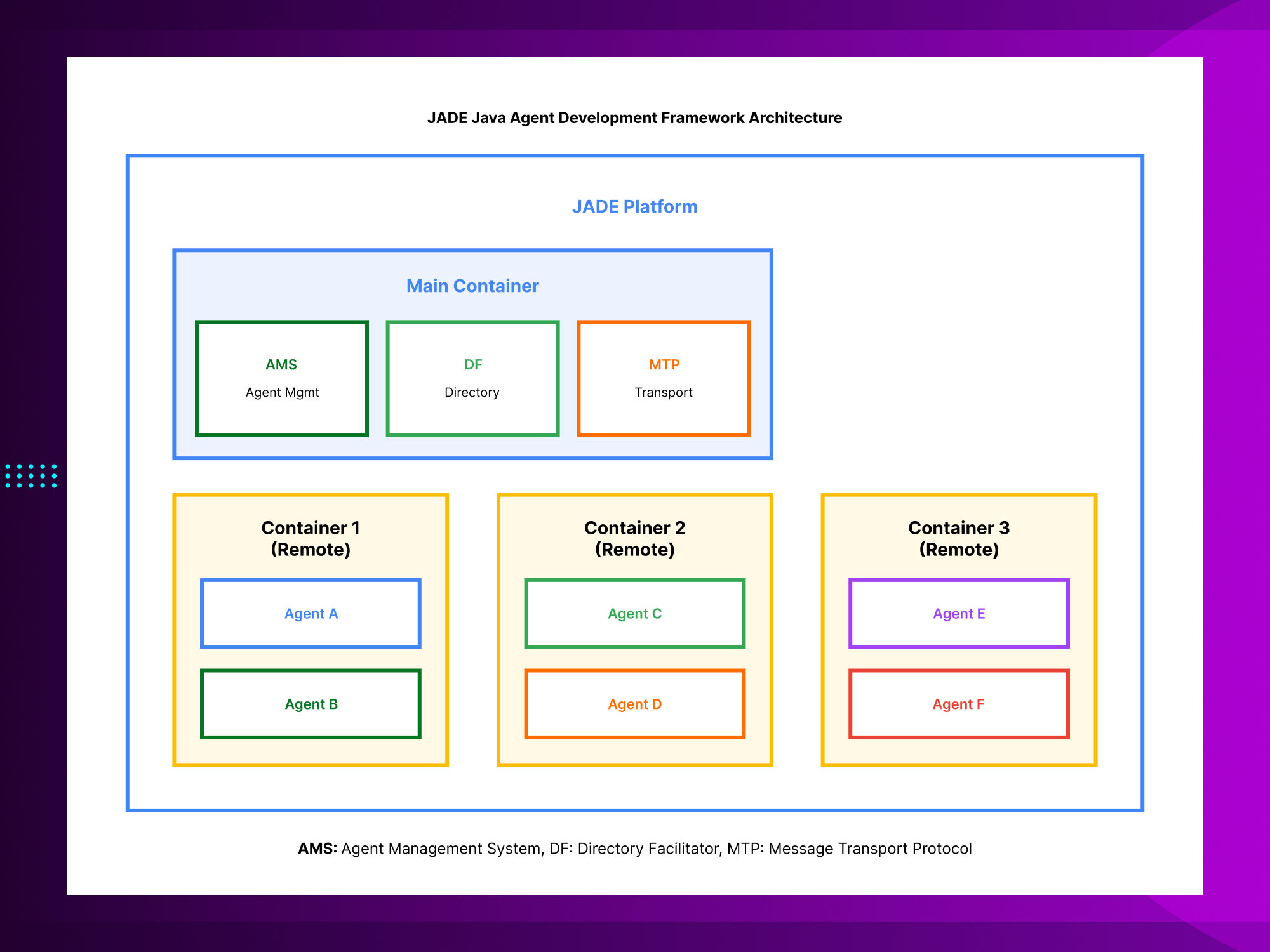
A JADE platform is the top-level runtime environment that hosts all your agents. Every JADE platform has exactly one Main Container, which is the central point that all other containers connect to. The Main Container hosts two special mandatory agents that run automatically whenever JADE starts.
Agent Management System (AMS)
The AMS is the white pages of the JADE platform. Every agent that joins the platform must register with the AMS, which assigns it a globally unique identifier called an Agent Identifier or AID. The AMS is also the authority that can create, kill, suspend, and move agents. When your agent code calls methods like getAMS() or uses the DFService, it is interacting with these platform-level services. The AMS is always reachable at the address ams@platformname:portnumber.
Directory Facilitator (DF)
The DF is the yellow pages of the JADE platform. Agents voluntarily register their services with the DF so that other agents can discover them by capability rather than by name. This is how decoupled, scalable multi-agent systems work: an agent that needs a translation service does not need to know which specific agent provides it. It queries the DF for agents offering translation, gets a list of matching AIDs, and contacts one of them. This discovery pattern is what makes JADE systems naturally load-balanced and fault-tolerant.
Agent Containers
Beyond the Main Container, a JADE platform can have any number of peripheral containers running on different JVM processes or different machines. Each container hosts some number of agents and connects to the Main Container at startup. From inside the platform, agents in any container can communicate with agents in any other container without any additional configuration. The Message Transport Protocol layer handles the routing transparently.
The JADE Agent Lifecycle: States and Transitions
Every agent in the JADE java agent development framework moves through a defined lifecycle with six possible states. Understanding this lifecycle is what allows you to write agents that handle failures gracefully, pause when idle, and resume processing when new work arrives.
INITIATED: the agent object has been created but not yet registered with the AMS. This is a transitional state that exists briefly during startup.
ACTIVE: the normal operating state. The agent is registered, has a thread, and its behaviors are being executed. Most of your agent code runs in this state.
SUSPENDED: the agent is temporarily paused. Its thread is blocked and no behaviors execute. An agent can suspend itself or be suspended by the AMS. This is useful for rate limiting or waiting for external events.
WAITING: similar to suspended but specifically tied to waiting for a message. When an agent calls blockingReceive(), it enters a waiting state until a matching message arrives, then returns to active automatically.
DELETED: the agent has been killed and deregistered from the AMS. Its AID is released and its resources freed.
TRANSIT: a mobile agent that is currently moving between containers. JADE supports agent mobility natively, though most production deployments do not use it.
LIFECYCLE INSIGHT:
The most important lifecycle transition to design for is the transition between ACTIVE and WAITING. Well-designed JADE agents spend most of their time in WAITING state, blocked on message receipt, rather than polling or spinning in loops. This is both more efficient and more responsive. Use blockingReceive() with a timeout rather than receive() in a loop.
JADE Java Agent Development Framework: Working Code Examples
The fastest way to understand the JADE framework is to read working code. All of the examples below are tested and run against JADE 4.6 with Java 11 or higher.
Step 1: Maven Dependency
Add JADE to your Maven project:
<dependency>
  <groupId>com.tilab.jade</groupId>
  <artifactId>jade</artifactId>
  <version>4.6.0</version>
</dependency>
Step 2: Creating Your First JADE Agent
Every JADE agent extends the Agent class and overrides setup() to register behaviors:
import jade.core.Agent;
import jade.core.behaviours.CyclicBehaviour;
import jade.lang.acl.ACLMessage;

public class HelloAgent extends Agent {

    @Override
    protected void setup() {
        System.out.println("Agent " + getLocalName() + " started.");

        // Add a cyclic behaviour that runs continuously
        addBehaviour(new CyclicBehaviour(this) {
            @Override
            public void action() {
                ACLMessage msg = receive();
                if (msg != null) {
                    System.out.println("Received: " + msg.getContent());
                } else {
                    block(); // suspend until a message arrives
                }
            }
        });
    }

    @Override
    protected void takeDown() {
        System.out.println("Agent " + getLocalName() + " terminating.");
    }
}
KEY POINT:
Notice the block() call inside the action() method. This is critical for performance in the JADE java agent development framework. Calling block() suspends this specific behavior until a new event, typically a message, wakes it up. Without block(), the JADE scheduler would spin this behavior in a tight loop consuming 100 percent of a CPU core.
Step 3: Sending an ACL Message Between Agents
ACL (Agent Communication Language) is the FIPA-standard message format JADE uses. Here is a complete sender agent:
import jade.core.Agent;
import jade.core.AID;
import jade.core.behaviours.OneShotBehaviour;
import jade.lang.acl.ACLMessage;

public class SenderAgent extends Agent {

    @Override
    protected void setup() {
        addBehaviour(new OneShotBehaviour(this) {
            @Override
            public void action() {
                ACLMessage msg = new ACLMessage(ACLMessage.REQUEST);

                // Receiver identified by local name on same platform
                msg.addReceiver(new AID("receiver-agent", AID.ISLOCALNAME));

                msg.setContent("Process order #12345");
                msg.setLanguage("English");
                msg.setOntology("order-management");

                send(msg);
                System.out.println("Message sent to receiver-agent");
            }
        });
    }
}
Step 4: Registering a Service with the Directory Facilitator
Agents that offer services register them with the DF so other agents can discover them dynamically:
import jade.core.Agent;
import jade.domain.DFService;
import jade.domain.FIPAAgentManagement.DFAgentDescription;
import jade.domain.FIPAAgentManagement.ServiceDescription;
import jade.domain.FIPAException;

public class ServiceProviderAgent extends Agent {

    @Override
    protected void setup() {
        // Register this agent in the DF yellow pages
        DFAgentDescription dfd = new DFAgentDescription();
        dfd.setName(getAID());

        ServiceDescription sd = new ServiceDescription();
        sd.setType("data-processing");
        sd.setName("csv-transformer");
        dfd.addServices(sd);

        try {
            DFService.register(this, dfd);
            System.out.println("Registered data-processing service in DF");
        } catch (FIPAException e) {
            e.printStackTrace();
        }
    }

    @Override
    protected void takeDown() {
        // Always deregister from DF on shutdown
        try {
            DFService.deregister(this);
        } catch (FIPAException e) {
            e.printStackTrace();
        }
    }
}
Step 5: Discovering Services and Contacting Providers
This is how a consumer agent finds and contacts service providers through the DF:
import jade.core.Agent;
import jade.core.AID;
import jade.core.behaviours.OneShotBehaviour;
import jade.domain.DFService;
import jade.domain.FIPAAgentManagement.DFAgentDescription;
import jade.domain.FIPAAgentManagement.ServiceDescription;
import jade.domain.FIPAException;
import jade.lang.acl.ACLMessage;

public class ServiceConsumerAgent extends Agent {

    @Override
    protected void setup() {
        addBehaviour(new OneShotBehaviour(this) {
            @Override
            public void action() {
                // Search DF for data-processing services
                DFAgentDescription template = new DFAgentDescription();
                ServiceDescription sd = new ServiceDescription();
                sd.setType("data-processing");
                template.addServices(sd);

                try {
                    DFAgentDescription[] results = DFService.search(myAgent, template);
                    if (results.length > 0) {
                        AID provider = results[0].getName();

                        ACLMessage request = new ACLMessage(ACLMessage.REQUEST);
                        request.addReceiver(provider);
                        request.setContent("transform sales_data.csv");
                        send(request);

                        System.out.println("Sent request to " + provider.getLocalName());
                    } else {
                        System.out.println("No data-processing service found in DF");
                    }
                } catch (FIPAException e) {
                    e.printStackTrace();
                }
            }
        });
    }
}
Step 6: Launching JADE with Your Agents
Launch JADE from the command line with your agents as arguments:
# Launch JADE with GUI and create agents on startup
java -cp jade.jar:your-agents.jar jade.Boot \
  -gui \
  -agents "provider:com.example.ServiceProviderAgent;consumer:com.example.ServiceConsumerAgent"

# Or launch from a main class:
jade.Boot.main(new String[]{
  "-gui",
  "-agents", "provider:com.example.ServiceProviderAgent;consumer:com.example.ServiceConsumerAgent"
});
JADE ACL Messaging: How Agents Communicate
The ACL message is the fundamental unit of communication in the JADE java agent development framework. ACL stands for Agent Communication Language, and it is the FIPA standard for structuring conversations between agents. Unlike raw socket communication or REST APIs, ACL messages carry semantic meaning beyond just data: they declare what the sender intends to accomplish with the message.
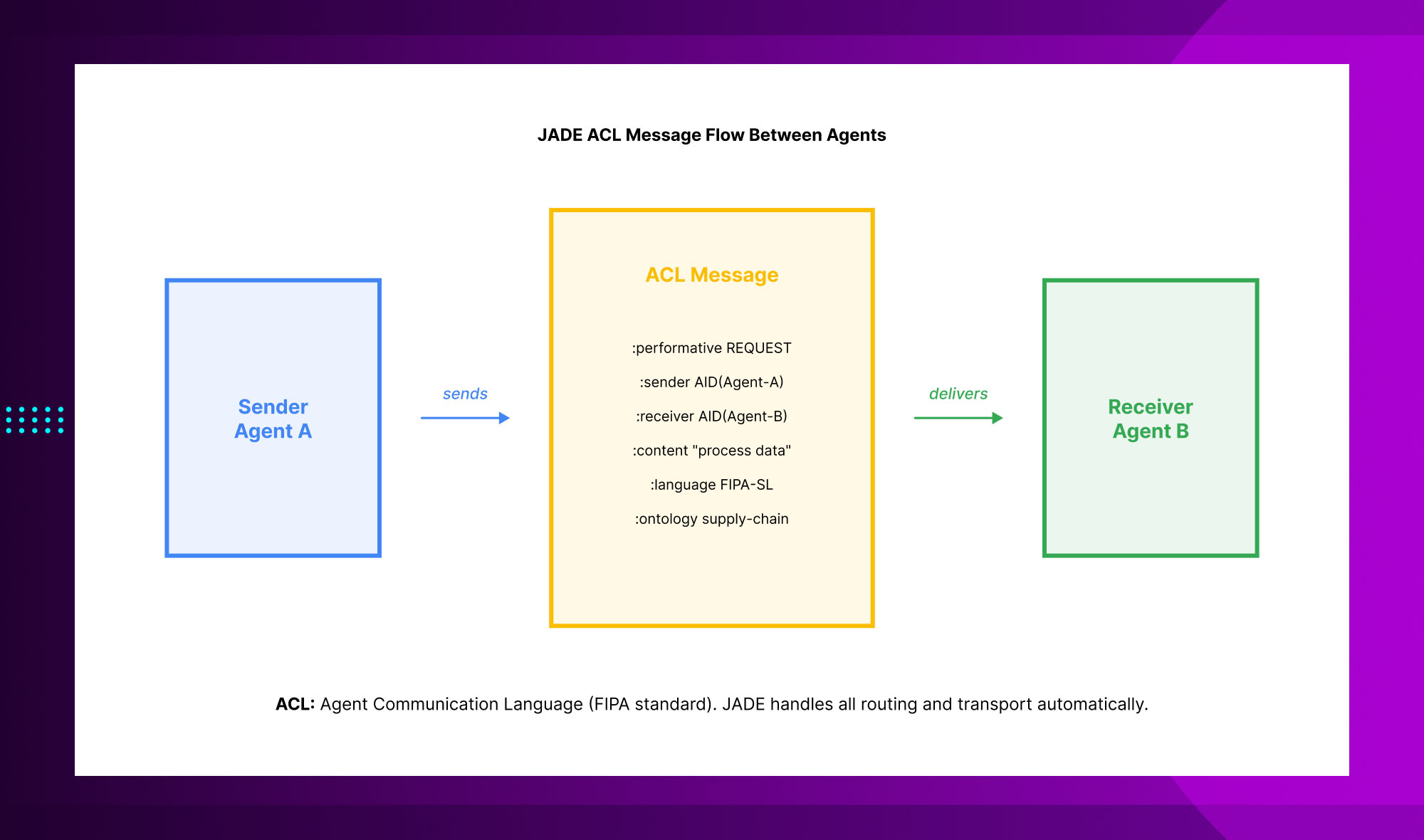
Performative: the most important field in an ACL message. It declares the communicative intent, whether the sender is making a REQUEST, sharing INFORM information, PROPOSING something, REFUSING, AGREEING, or one of the other defined performatives from the FIPA specification. Choosing the right performative is what makes agent conversations interpretable by other FIPA-compliant systems.
Sender and receiver AIDs: the globally unique identifiers of the sending and receiving agents. A message can have multiple receivers for broadcast scenarios.
Content: the actual payload of the message. In simple cases this is a string. In structured systems it is typically a formal representation in a content language like FIPA-SL, with an associated ontology that defines the vocabulary.
Ontology: declares the shared vocabulary that sender and receiver use to interpret the content field. If your agents are booking appointments, your ontology might define concepts like Schedule, TimeSlot, and Appointment. Both agents must share the same ontology for the content to be interpretable.
Conversation ID: a string that links multiple messages together into a conversation. If your contract net protocol involves five exchanges between two agents, all five messages share the same conversation ID, allowing each agent to maintain context across exchanges.
JADE vs Repast vs SPADE vs AnyLogic: Choosing the Right Multi-Agent Framework
No multi-agent framework is universally best. The right choice depends on your language preference, your deployment environment, whether you need FIPA compliance, and how much operational complexity your team can absorb. Here is an honest, current comparison.
JADE vs Repast vs SPADE vs AnyLogic: Choosing the Right Multi-Agent Framework
| JADE | Repast | SPADE | AnyLogic | |
|---|---|---|---|---|
| License | LGPL 2 (free, open) | GPL 3 | MIT / open | Commercial + free tier |
| Language | Java | Java / Python | Python | Java / others |
| FIPA Compliance | Full | Partial | No | Partial |
| Best for | Distributed agents, enterprise | Social simulation | AI research, Python stacks | Visual modeling, GIS |
| Learning curve | Moderate | Moderate | Low (Python) | High |
| Production maturity | High, 20+ years | High, widely cited | Growing fast | High |
| JADE | |
|---|---|
| License | LGPL 2 (free, open) |
| Language | Java |
| FIPA Compliance | Full |
| Best for | Distributed agents, enterprise |
| Learning curve | Moderate |
| Production maturity | High, 20+ years |
| Repast | |
|---|---|
| License | GPL 3 |
| Language | Java / Python |
| FIPA Compliance | Partial |
| Best for | Social simulation |
| Learning curve | Moderate |
| Production maturity | High, widely cited |
| SPADE | |
|---|---|
| License | MIT / open |
| Language | Python |
| FIPA Compliance | No |
| Best for | AI research, Python stacks |
| Learning curve | Low (Python) |
| Production maturity | Growing fast |
| AnyLogic | |
|---|---|
| License | Commercial + free tier |
| Language | Java / others |
| FIPA Compliance | Partial |
| Best for | Visual modeling, GIS |
| Learning curve | High |
| Production maturity | High |
Real-World Use Cases for JADE in Enterprise Systems
The JADE java agent development framework has been deployed in production across a wide range of industries over its twenty-plus year history. Here is where it has the strongest track record.
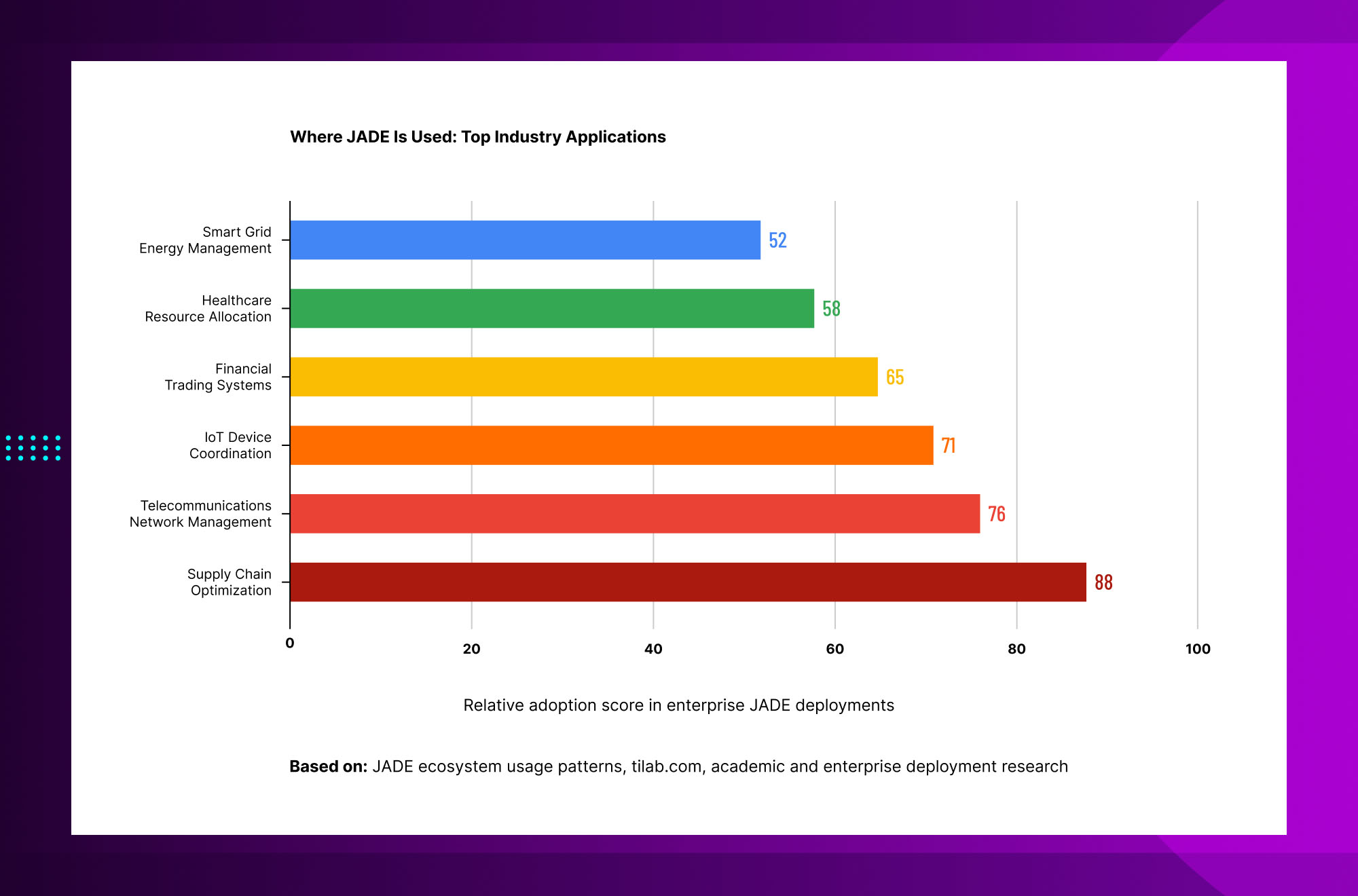
Supply chain optimization: JADE agents model suppliers, logistics providers, and demand forecast systems as autonomous entities that negotiate resource allocation in real time. When a shipment delay occurs, supplier agents automatically renegotiate delivery timelines without human intervention, compressing response time from hours to seconds.
Telecommunications network management: JADE was originally developed at Telecom Italia for exactly this use case. Agents monitor network nodes, detect congestion or failure conditions, and coordinate rerouting decisions autonomously. The same company, now TIM, continues to use JADE in production network operations.
IoT device coordination: in smart building and industrial IoT systems, JADE agents represent physical devices including HVAC units, sensors, and actuators. The DF service discovery mechanism maps naturally to the problem of devices discovering and negotiating with each other as they join and leave the network.
Financial trading systems: JADE agents model market participants that monitor price signals, evaluate portfolio positions, and execute trades based on rules encoded in their behavior logic. The FIPA contract net protocol, built into JADE, maps directly to bid-ask negotiation patterns.
Healthcare resource allocation: hospitals use JADE to coordinate operating room scheduling, bed allocation, and specialist assignment across departments. Agents representing different care units negotiate resource access autonomously, reducing scheduling conflicts and improving throughput.
Smart grid energy management: JADE coordinates distributed energy resources including solar panels, battery storage, and demand response systems across a grid. Agents negotiate production and consumption in real time based on current grid state, enabling more efficient integration of renewable sources.
JADE Development Tools and Debugging
One of the reasons developers choose the JADE java agent development framework over building multi-agent infrastructure from scratch is the set of built-in tools that come with it.
JADE GUI (Sniffer and Introspector): the Sniffer agent intercepts and displays all ACL messages passing between agents in a sequence diagram view. The Introspector shows the internal state of any running agent, its behaviors, its message queue, and its lifecycle state. Both are invaluable during development.
Remote Monitoring Agent (RMA): the graphical control panel for a JADE platform. From the RMA you can see all containers and agents, start and kill agents, move agents between containers, and connect to remote platforms.
Dummy Agent: a built-in test agent that lets you compose and send ACL messages manually to any agent in the platform, without writing any code. Essential for testing agent behavior in isolation.
Log Manager Agent: centralized logging infrastructure for distributed JADE deployments where you need to aggregate logs from agents running on multiple machines.
PERFORMANCE NOTE:
JADE’s built-in tools, particularly the Sniffer agent, add significant overhead because they intercept and record every message. Always disable the Sniffer and Introspector in production deployments. In high-throughput systems, even running the RMA GUI in the same JVM as your agents can affect performance; consider running it in a separate container connected remotely.
Frequently Asked Questions About the JADE Java Agent Development Framework
Getting Started with the JADE Java Agent Development Framework
The JADE java agent development framework gives you a production-tested, FIPA-compliant foundation for building multi-agent systems without writing the agent runtime, the message transport layer, or the service discovery infrastructure from scratch. Its twenty-plus year production history in telecommunications, supply chain, and IoT makes it a low-risk choice for enterprise projects where multi-agent coordination is a core architectural requirement.
The fastest way to evaluate JADE for your project is to download the latest release from tilab.com, run the examples above against a local JADE platform, and use the RMA and Sniffer GUI tools to watch your agents communicate in real time. Most developers can have a working two-agent system communicating through the DF within a few hours of first contact with the framework.
If you need a more complex JADE deployment, integration with existing Java services, or help designing an agent protocol for a specific business problem, that is exactly the kind of work where having an experienced JADE development team makes the difference between a prototype and a production system.
At Trantor (trantorinc.com), we have experienced Java and JADE developers who have built multi-agent systems for supply chain optimization, IoT coordination, and enterprise integration projects. Whether you need a complete JADE implementation, a review of an existing agent architecture, or dedicated JADE developers to join your team, we are ready to help. Reach out at trantorinc.com to start the conversation.
Explore Trantor’s Java Development and AI Agent Services: Artificial Intelligence